MCP Server 插件配置
mcp-server插件提供了基于 Model Context Protocol (MCP) 的 AI 工具集成能力。MCP 是一种专为 AI 助手设计的协议,它定义了 AI 模型与外部工具和资源交互的标准方式。通过此插件,您可以:
- 无需编写代码,将现有的 REST API 转换为 AI 助手可调用的工具
- 利用 Higress 网关提供的统一认证、鉴权、限流和可观测性能力
- 快速构建和部署 AI 工具和服务
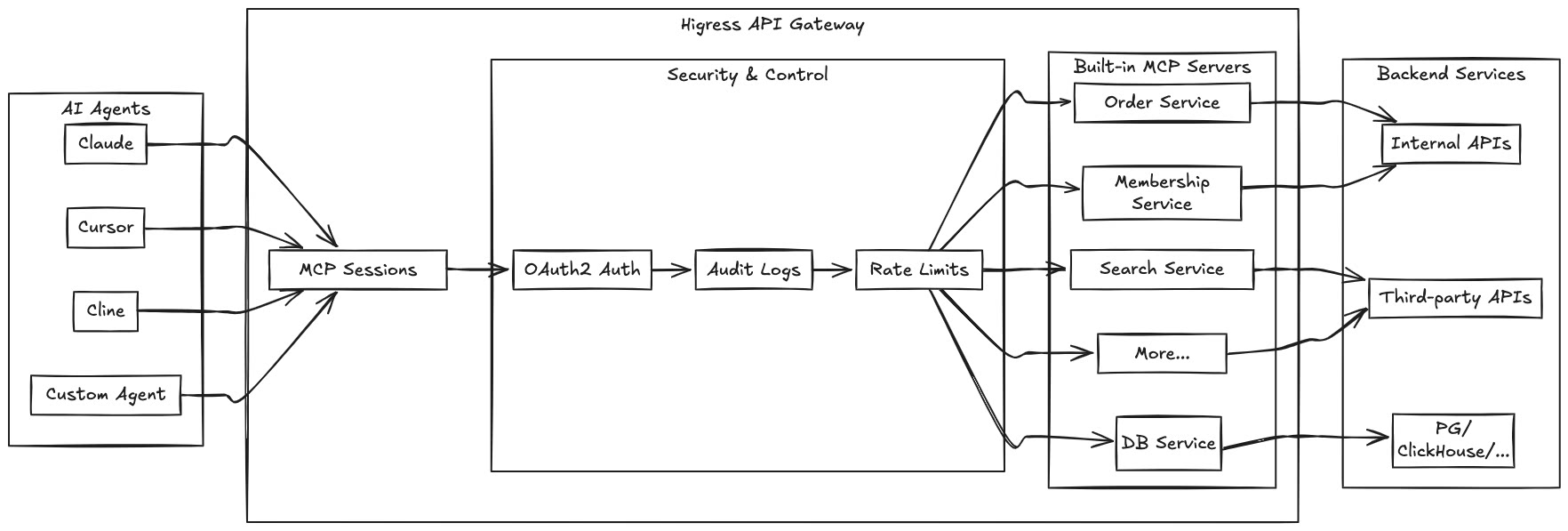
通过 Higress 托管 MCP Server,可以实现:
- 统一的认证和鉴权机制,确保 AI 工具调用的安全性
- 精细化的速率限制,防止滥用和资源耗尽
- 完整的审计日志,记录所有工具调用行为
- 丰富的可观测性,监控工具调用的性能和健康状况
- 简化的部署和管理,通过 Higress 插件机制快速添加新的 MCP Server
插件执行阶段:默认阶段
插件执行优先级:30
| 名称 | 数据类型 | 填写要求 | 默认值 | 描述 |
|---|---|---|---|---|
server.name | string | 必填 | - | MCP 服务器的名称。使用内置服务时填写对应名称,并按该服务要求配置 server.config,无需配置 tools。REST-to-MCP 场景可自定义名称。 |
server.type | string | 选填 | rest | MCP 服务器类型。可选值:rest(REST-to-MCP 转换)、mcp-proxy(MCP 代理)。如果不指定,默认为 rest 类型。 |
server.config | object | 选填 | {} | 服务器配置,如 API 密钥等 |
server.mcpServerURL | string | 当 server.type 为 mcp-proxy 时必填 | - | 后端 MCP 服务器的 URL 地址。仅在 mcp-proxy 类型时使用。支持完整 URL(如 http://example.com/mcp)或路径(如 /mcp,将使用路由集群的基础 URL)。 |
server.timeout | integer | 选填 | 5000 | 单次后端 HTTP 请求的超时时间,单位为毫秒。适用于 mcp-proxy;涉及探测、初始化等多个步骤时,不代表整个调用流程的总超时。 |
server.transport | string | 当 server.type 为 mcp-proxy 时必填 | - | 后端传输方式:http 用于基于 HTTP 的 MCP,sse 用于旧版 HTTP+SSE。 |
server.passthroughAuthHeader | boolean | 选填 | false | 仅适用于 MCP 代理,用于原样透传客户端完整的 Authorization 请求头。直接透传场景建议单独使用此选项;同时配置上游认证方案时,优先按该方案生成后端凭证。此选项不校验凭证有效性。 |
server.securitySchemes | array of object | 选填 | - | 定义可重用的认证方案,供工具引用。详见”认证与安全”章节。 |
server.defaultDownstreamSecurity | object | 选填 | - | 默认的客户端凭证提取配置,可被工具级 security 覆盖。支持 id 和 passthrough,不负责校验客户端身份。适用范围见“认证与安全”。 |
server.defaultUpstreamSecurity | object | 选填 | - | 默认的后端认证配置,可被工具级 requestTemplate.security 覆盖。id 引用认证方案;REST-to-MCP 还支持通过 credential 覆盖默认凭证。MCP 代理的固定凭证使用认证方案的 defaultCredential。 |
server.version | string | 选填 | 1.0.0 | 服务版本号,用于旧版 MCP 的初始化响应。此字段不用于选择 MCP 协议版本。 |
server.protocolStrategy | string | 选填 | legacy | MCP 代理访问后端时使用的协议策略:legacy、modern 或 auto。仅适用于 mcp-proxy,详见“协议支持与后端连接”。 |
server.autoDetection.probeTimeoutMs | integer | 选填 | 1000 | 自动识别后端协议时的探测超时,单位为毫秒,必须为正整数。仅在 protocolStrategy: auto 且 transport: http 时使用;实际探测超时不超过 server.timeout。 |
使用 toolSet 可以组合多个服务中已注册的工具。单个服务使用 server 配置,组合工具集使用 toolSet 配置,两者应选择其一。
toolSet 提供组合后的工具列表,工具调用需要配合 mcp-router 插件路由到原服务。它不会根据后端地址自动发现或导入工具。
| 名称 | 数据类型 | 配置说明 |
|---|---|---|
toolSet.name | string | 工具集名称。 |
toolSet.version | string | 工具集版本号,默认 1.0.0,用于旧版 MCP 的初始化响应。 |
toolSet.serverTools | array of object | 要组合的服务及工具。 |
toolSet.serverTools[].serverName | string | 工具所属的已注册服务名称。 |
toolSet.serverTools[].tools | array of string | 从该服务中选取的工具名称。 |
以下示例的前提是 weather-server 的 get_weather 工具已经注册,并已配置 mcp-router 将工具调用路由到原服务:
toolSet: name: travel-tools version: "1.0.0" serverTools: - serverName: weather-server tools: - get_weather组合后的工具名称为 服务名称___工具名称,例如 weather-server___get_weather。
允许的工具配置
Section titled “允许的工具配置”| 名称 | 数据类型 | 填写要求 | 默认值 | 描述 |
|---|---|---|---|---|
allowTools | array of string | 选填 | - | 允许调用的工具列表。如不指定,则允许所有工具 |
动态工具权限控制
Section titled “动态工具权限控制”除了在配置中静态定义 allowTools 外,还支持通过 HTTP 请求头 x-envoy-allow-mcp-tools 动态控制工具访问权限。这使得前置插件(如认证、鉴权插件)可以根据用户身份或其他条件动态设置允许的工具列表。
Header 格式:
x-envoy-allow-mcp-tools: tool1,tool2,tool3权限控制逻辑:
- 配置级别
allowTools(静态):在插件配置中定义的基础工具白名单 - Header 级别
x-envoy-allow-mcp-tools(动态):从请求头中读取的工具白名单 - 最终生效权限:配置和 Header 中指定的工具列表的交集
Header 值的语义:
| Header 状态 | 行为 |
|---|---|
| Header 不存在 | 没有额外限制,使用配置中的 allowTools |
Header 为空字符串 "" | 没有额外限制,使用配置中的 allowTools |
Header 为空白字符串 " , , " | 禁止访问所有工具(空集合) |
Header 有值 "tool1,tool2" | 与配置的 allowTools 取交集 |
使用场景示例:
-
基于用户角色的权限控制
# 配置中定义所有可用工具allowTools:- get-user-info- update-user-info- delete-user-info- admin-operation前置认证插件可以根据用户角色设置不同的工具权限:
- 普通用户:
x-envoy-allow-mcp-tools: get-user-info - 高级用户:
x-envoy-allow-mcp-tools: get-user-info,update-user-info - 管理员:不设置 header(允许所有配置中的工具)
- 普通用户:
-
多租户场景
# 配置中定义租户可用的工具allowTools:- tenant-query-data- tenant-update-data- tenant-report前置插件根据租户订阅套餐动态控制:
- 基础版:
x-envoy-allow-mcp-tools: tenant-query-data - 专业版:
x-envoy-allow-mcp-tools: tenant-query-data,tenant-update-data - 企业版:
x-envoy-allow-mcp-tools: tenant-query-data,tenant-update-data,tenant-report
- 基础版:
-
临时权限限制
在特殊情况下(如系统维护),前置插件可以临时限制某些工具的访问:
x-envoy-allow-mcp-tools: read-only-tool1,read-only-tool2
前置插件集成指南:
对于需要动态设置工具权限的前置插件(如认证、鉴权插件),必须使用 proxywasm.ReplaceHttpRequestHeader 来设置 x-envoy-allow-mcp-tools header:
// 正确的方式:使用 ReplaceHttpRequestHeader// 这会覆盖用户可能传入的任何值,确保安全性proxywasm.ReplaceHttpRequestHeader("x-envoy-allow-mcp-tools", "tool1,tool2,tool3")
// ❌ 错误的方式:使用 AddHttpRequestHeader// 这可能导致用户传入的值被保留,造成安全隐患proxywasm.AddHttpRequestHeader("x-envoy-allow-mcp-tools", "tool1,tool2,tool3")
使用 ReplaceHttpRequestHeader 可以确保:
- 安全性:用户无法通过直接在请求中传入
x-envoy-allow-mcp-toolsheader 来绕过权限控制 - 可靠性:前置插件设置的权限配置始终生效,不会被用户输入覆盖
- 可预测性:MCP Server 插件接收到的始终是前置插件设置的权限值
注意事项:
- Header 值使用逗号分隔多个工具名称
- 工具名称前后的空白字符会被自动去除
- 当配置的
allowTools为空数组时,无论 header 如何设置,都会禁止所有工具访问 - MCP Server 插件会自动移除
x-envoy-allow-mcp-toolsheader,不会传递给后端服务
REST-to-MCP 工具配置
Section titled “REST-to-MCP 工具配置”| 名称 | 数据类型 | 填写要求 | 默认值 | 描述 |
|---|---|---|---|---|
tools | array of object | 选填 | [] | REST-to-MCP 工具配置列表 |
tools[].name | string | 必填 | - | 工具名称 |
tools[].description | string | 必填 | - | 工具功能描述 |
tools[].args | array of object | 必填 | [] | 工具参数定义 |
tools[].args[].name | string | 必填 | - | 参数名称 |
tools[].args[].description | string | 必填 | - | 参数描述 |
tools[].args[].type | string | 选填 | string | 参数类型(string, number, integer, boolean, array, object) |
tools[].args[].required | boolean | 选填 | false | 参数是否必需 |
tools[].args[].default | any | 选填 | - | 参数默认值 |
tools[].args[].enum | array | 选填 | - | 参数允许的值列表 |
tools[].args[].items | object | 选填 | - | 数组项的模式(当type为array时) |
tools[].args[].properties | object | 选填 | - | 对象属性的模式(当type为object时) |
tools[].args[].position | string | 选填 | - | 参数在请求中的位置(query, path, header, cookie, body) |
tools[].requestTemplate | object | 按场景填写 | - | 调用 REST API 时配置;直接响应模式可省略。 |
tools[].requestTemplate.url | string | 调用 REST API 时必填 | - | 请求 URL 模板。省略或为空时使用直接响应模式。 |
tools[].requestTemplate.method | string | 调用 REST API 时填写 | - | HTTP 方法,如 GET、POST。直接响应模式不需要。 |
tools[].requestTemplate.headers | array of object | 选填 | [] | 请求头模板 |
tools[].requestTemplate.headers[].key | string | 必填 | - | 请求头名称 |
tools[].requestTemplate.headers[].value | string | 必填 | - | 请求头值模板 |
tools[].requestTemplate.body | string | 选填 | - | 显式构造请求体的模板。配置后不再自动组装 JSON 或表单请求体;查询参数仍可单独配置。 |
tools[].requestTemplate.argsToJsonBody | boolean | 选填 | false | 将未指定 position 的参数作为 JSON 请求体。三个 argsTo* 开关最多启用一个;使用 body 时无需启用此项。 |
tools[].requestTemplate.argsToUrlParam | boolean | 选填 | false | 将未指定 position 的参数添加到 URL 查询参数。三个 argsTo* 开关最多启用一个;可与 body 模板配合使用。 |
tools[].requestTemplate.argsToFormBody | boolean | 选填 | false | 将未指定 position 的参数编码为表单请求体。三个 argsTo* 开关最多启用一个;使用 body 时无需启用此项。 |
tools[].responseTemplate | object | 选填 | - | 响应转换模板。不配置时使用后端原始响应;直接响应模式必须配置 body。 |
tools[].responseTemplate.body | string | 直接响应模式必填,其他场景选填 | - | 响应体模板,不能与 prependBody、appendBody 同时使用。 |
tools[].responseTemplate.prependBody | string | 选填 | - | 在响应体前插入的文本(与body互斥) |
tools[].responseTemplate.appendBody | string | 选填 | - | 在响应体后插入的文本(与body互斥) |
tools[].security | object | 选填 | - | 工具级客户端凭证提取配置,支持凭证透传,不负责校验客户端身份。 |
tools[].security.id | string | 当 tools[].security 配置时必填 | - | 引用在 server.securitySchemes 中定义的认证方案 ID。 |
tools[].security.passthrough | boolean | 选填 | false | 启用凭证透传。成功提取到非空客户端凭证时,按 requestTemplate.security 指定的方案用于后端请求。 |
tools[].requestTemplate.security | object | 选填 | - | HTTP 请求模板的安全配置,用于定义 MCP Server 和 REST API 之间的认证方式。 |
tools[].requestTemplate.security.id | string | 当 tools[].requestTemplate.security 配置时必填 | - | 引用在 server.securitySchemes 中定义的认证方案 ID。 |
tools[].requestTemplate.security.credential | string | 选填 | - | REST-to-MCP 的后端凭证,覆盖所引用方案的 defaultCredential。启用透传且成功提取到非空凭证时,优先使用透传凭证。 |
tools[].errorResponseTemplate | string | 选填 | - | HTTP 响应状态码大于等于 300 或小于 200 时使用的错误响应转换模板。 |
tools[].legacyOnly | boolean | 选填 | false | 仅供旧版 MCP 客户端使用。设为 true 后,工具不会出现在 MCP 2026-07-28 的工具列表中,也不能通过该版本调用。 |
tools[].outputSchema | object | 选填 | - | 工具结构化输出的 JSON Schema。当前旧版工具列表会返回该字段,MCP 2026-07-28 的工具列表暂不返回;插件不会据此校验输出是否符合 Schema。 |
不配置 requestTemplate.url 或将其设为空时,工具不会请求后端,而是使用 responseTemplate.body 直接生成结果。模板中可以访问 .args 和 .config。
server:  name: greeting-server  type: rest
tools:- name: greet  description: 根据姓名生成问候语  args:  - name: name    description: 用户姓名    type: string    required: true  responseTemplate:    body: "你好,{{.args.name}}!"
结构化输出与兼容性
Section titled “结构化输出与兼容性”配置 outputSchema 后,如果后端响应为合法 JSON,插件会将后端原始 JSON 同时作为 structuredContent 返回;responseTemplate 生成的文本不会替换这部分结构化内容。直接响应模式则使用模板生成的合法 JSON 作为结构化内容。
MCP 2026-07-28 会在调用工具前校验输入参数。如果工具的参数定义无法用于校验,该工具可能仍出现在列表中,但调用会被拒绝。需要暂时保留旧版调用的工具,可设置 legacyOnly: true。
协议支持与后端连接
Section titled “协议支持与后端连接”插件支持 MCP 2024-11-05、2025-03-26、2025-06-18 和 2026-07-28 的工具服务能力。
使用内置工具或 REST-to-MCP 时,无需配置后端 MCP 协议策略。代理已有 MCP Server 时,需要根据后端能力配置 transport 和 protocolStrategy。
transport 指定连接后端的传输方式:
| 配置值 | 使用场景 |
|---|---|
http | 通过 HTTP 访问后端 MCP 服务,支持旧版及 MCP 2026-07-28 后端。 |
sse | 接入旧版 HTTP+SSE 后端。 |
protocolStrategy 指定访问后端时使用的 MCP 协议策略:
| 配置值 | 使用场景 | 要求 |
|---|---|---|
legacy | 后端使用旧版 MCP 协议;也是未配置时的默认值。 | 可使用 http 或 sse。 |
modern | 后端使用 MCP 2026-07-28。 | 必须使用 http。 |
auto | 使用 MCP 2026-07-28 的客户端访问时,自动识别 HTTP 后端的协议。 | 使用 http。 |
例如,代理 MCP 2026-07-28 后端:
server: name: my-mcp-proxy type: mcp-proxy transport: http protocolStrategy: modern mcpServerURL: "https://mcp.example.com/mcp" timeout: 5000如需自动识别后端协议,在 server 下将相关配置改为:
protocolStrategy: auto autoDetection: probeTimeoutMs: 1000使用时注意:
- MCP
2026-07-28客户端可以通过插件访问旧版后端;旧版客户端不能通过插件访问仅支持 MCP2026-07-28的后端。 auto的自动探测仅用于 MCP2026-07-28客户端请求;旧版客户端请求仍按旧版流程处理。- 自动探测会增加后端请求。后端协议已知时,可以直接配置
legacy或modern。 - 自动探测请求使用配置的后端凭证,后端需要允许对应凭证访问发现接口。同一路由的后端实例应保持协议能力一致。
transport: sse表示插件能够接入旧版 SSE 后端,不代表向客户端提供通用的实时订阅或消息推送能力。
本节配置用于管理插件访问后端时使用的凭证,包括固定凭证、客户端凭证提取和凭证透传。
defaultDownstreamSecurity 和工具级 security 定义从客户端请求中提取凭证的方式,不负责校验凭证有效性。客户端身份校验和访问授权需要通过 Higress 的认证、鉴权插件配置。
defaultUpstreamSecurity 和工具级 requestTemplate.security 定义访问后端时使用的认证方案。
定义认证方案 (server.securitySchemes)
Section titled “定义认证方案 (server.securitySchemes)”您可以在服务器级别定义一组可重用的认证方案。这些方案之后可以被各个工具引用,用于配置 MCP Server 向后端 REST API 发起请求时的认证方式。
配置字段 (server.securitySchemes[]):
| 名称 | 数据类型 | 填写要求 | 描述 |
|---|---|---|---|
id | string | 必填 | 认证方案的唯一标识符,供工具配置引用。 |
type | string | 必填 | 认证类型,支持 http (用于 Basic 和 Bearer认证) 和 apiKey。 |
scheme | string | 选填 | 当 type 为 http 时指定具体的方案,如 basic 或 bearer。 |
in | string | 选填 | 当 type 为 apiKey 时指定 API 密钥的位置,如 header 或 query。 |
name | string | 选填 | 当 type 为 apiKey 时指定 Header 名称或查询参数名称。 |
defaultCredential | string | 选填 | 此方案的默认凭证。例如,对于 Basic Auth,可以是 “user:password”;对于 Bearer Token,是 Token 本身;对于 API Key,是 Key 本身。 |
示例 (server.securitySchemes):
server: name: my-api-server securitySchemes: - id: MyBasicAuth type: http scheme: basic defaultCredential: "admin:secretpassword" # 默认的用户名和密码 - id: MyBearerToken type: http scheme: bearer defaultCredential: "eyJhbGciOiJIUzI1NiIsInR5cCI6IkpXVCJ9..." # 默认的Bearer Token - id: MyApiKeyInHeader type: apiKey in: header name: X-Custom-API-Key # API Key 在名为 X-Custom-API-Key 的 Header 中 defaultCredential: "abcdef123456" # 默认的 API Key - id: MyApiKeyInQuery type: apiKey in: query name: "api_token" # API Key 在名为 api_token 的查询参数中 defaultCredential: "uvwxyz789012"在工具中应用认证方案
Section titled “在工具中应用认证方案”在 REST-to-MCP 场景中,定义 server.securitySchemes 后,可以在工具的 requestTemplate.security 中通过 id 引用方案,指定调用后端 REST API 时使用的认证方式。
tools[].requestTemplate.security.id: 引用server.securitySchemes中定义的认证方案的id。tools[].requestTemplate.security.credential: REST-to-MCP 的可选凭证覆盖值。未使用透传凭证时,它会覆盖所引用方案的defaultCredential。MCP 代理的固定凭证应配置在认证方案的defaultCredential中。
示例:
tools:- name: get-user-details # ... 其他工具配置 ... requestTemplate: url: "https://api.example.com/users/{{.args.userId}}" method: GET security: id: MyBearerToken # 使用上面定义的 MyBearerToken 方案 # credential: "override_token_for_this_tool" # 可选:为此工具覆盖默认Token# ...- name: update-inventory # ... 其他工具配置 ... requestTemplate: url: "https://api.example.com/inventory/{{.args.itemId}}" method: POST security: id: MyApiKeyInHeader # 使用 MyApiKeyInHeader 方案 # 此工具将使用 MyApiKeyInHeader 中定义的 defaultCredential透明认证 (Passthrough Authentication)
Section titled “透明认证 (Passthrough Authentication)”透明认证功能允许将 MCP Client (例如 AI 助手) 调用 MCP Server 时提供的凭证,透传给 MCP Server 调用后端 REST API 时的认证过程。
配置方式:
-
在
server.securitySchemes中定义相关方案,分别用于提取客户端凭证和向后端 REST API 添加凭证。 -
配置工具级别凭证提取 (
tools[].security): 在需要透传凭证的工具中,配置security字段:id: 引用客户端凭证提取方案。插件按该方案提取凭证,并清理原始请求中的该凭证,不校验其有效性。passthrough: true: 启用透明认证。
-
配置请求模板认证 (
tools[].requestTemplate.security): 在工具的requestTemplate中,配置security字段:id: 引用server.securitySchemes中定义的、用于 MCP Server 与后端 REST API 之间的认证方案。- 当
tools[].security.passthrough为true时,从客户端提取的凭证将根据此requestTemplate.security方案应用于对后端 REST API 的调用。
示例:
假设 MCP Client 使用 Bearer Token 调用 MCP Server,而 MCP Server 需要使用 API Key 调用后端的 REST API。
server:  name: product-api-server  securitySchemes:  - id: ClientSideBearer # 客户端使用Bearer Token    type: http    scheme: bearer  - id: BackendApiKey    # 后端API使用X-API-Key    type: apiKey    in: header    name: X-API-Key    # defaultCredential: "optional_default_backend_key"
tools:- name: get-product-securely description: "获取产品信息(安全透传)" security: # 从客户端请求中提取凭证 id: ClientSideBearer # 提取客户端的 Bearer Token passthrough: true # 启用透传 args: - name: product_id description: "产品ID" type: string required: true requestTemplate: security: # MCP Server -> 后端 REST API 认证配置 id: BackendApiKey # 后端API需要此方案。透传的凭证将按此方案应用。 url: "https://api.example.com/products/{{.args.product_id}}" method: GET工作流程:
- MCP Client 发起请求到 MCP Server 的
get-product-securely工具,并在Authorization头中携带Bearer <client_token>。 - MCP Server 根据
tools[].security(id:ClientSideBearer) 识别出客户端使用的是 Bearer Token。它会从请求中提取<client_token>并移除原始的Authorization头。 - 因为
passthrough: true,提取出的<client_token>被标记为透传凭证。 - MCP Server 准备调用后端 REST API。它查看
requestTemplate.security(id:BackendApiKey)。 - 由于启用了透传,MCP Server 将之前提取的
<client_token>作为凭证值,按照BackendApiKey方案(即作为名为X-API-Key的 HTTP Header)添加到对https://api.example.com/products/...的请求中。 - 后端 REST API 收到请求,其中
X-API-KeyHeader 的值为<client_token>。
注意事项:
- 启用
tools[].security.passthrough且成功提取到非空凭证时,优先使用透传凭证。未提取到凭证时,仍可能使用配置的固定凭证。 - 透传的是提取后的凭证值,例如 Bearer Token 值或 Basic 凭证的 Base64 编码部分,再按后端方案添加到请求中。请确保凭证格式与目标方案兼容。
服务器级别默认认证配置
Section titled “服务器级别默认认证配置”服务器级默认配置用于减少工具间重复的凭证配置。REST-to-MCP 在工具调用时使用这些配置;MCP 代理还会在访问后端工具列表时使用服务器级默认配置。它们不等同于对所有 MCP 接口启用入口认证。
server.defaultDownstreamSecurity
Section titled “server.defaultDownstreamSecurity”定义默认的客户端凭证提取方式,可被工具级 security 覆盖。
id:引用server.securitySchemes中定义的凭证提取方案。passthrough:是否将提取到的凭证用于后端请求,默认为false。
server.defaultUpstreamSecurity
Section titled “server.defaultUpstreamSecurity”定义默认的后端认证配置,可被工具级 requestTemplate.security 覆盖。
id:引用server.securitySchemes中定义的后端认证方案。credential:REST-to-MCP 中可选的凭证覆盖值。MCP 代理的固定凭证使用认证方案的defaultCredential。
工具级 security 覆盖服务器级 defaultDownstreamSecurity;工具级 requestTemplate.security 覆盖服务器级 defaultUpstreamSecurity。
启用凭证透传并成功提取到非空凭证时,优先使用该凭证。未提取到凭证时,仍可能使用配置的固定凭证:
- REST-to-MCP:使用所选上游认证配置中的
credential;未配置时使用对应认证方案的defaultCredential。 - MCP 代理:使用认证方案中的
defaultCredential。不同工具需要不同固定凭证时,定义不同的认证方案并分别引用。
参数类型支持
Section titled “参数类型支持”REST-to-MCP 工具支持多种参数类型,使您可以更精确地定义工具参数:
- string: 字符串类型(默认)
- number: 数字类型(浮点数)
- integer: 整数类型
- boolean: 布尔类型(true/false)
- array: 数组类型,使用
items字段定义数组元素的模式 - object: 对象类型,使用
properties字段定义对象属性的模式
示例:
args:- name: query description: "搜索关键词" type: string required: true- name: limit description: "返回结果数量" type: integer default: 10- name: filters description: "过滤条件" type: object properties: category: type: string enum: ["food", "hotel", "attraction"] price: type: integer minimum: 0- name: coordinates description: "坐标点列表" type: array items: type: object properties: lat: type: number lng: type: number参数位置控制
Section titled “参数位置控制”REST-to-MCP 工具支持通过 position 字段精确控制每个参数在请求中的位置。这使您可以更灵活地构建 API 请求,例如同时使用路径参数、查询参数和请求体参数。
支持的位置类型
Section titled “支持的位置类型”- query: 参数将作为查询参数添加到 URL 中
- path: 参数将替换 URL 中的路径占位符,例如
/pet/{petId}中的{petId} - header: 参数将作为 HTTP 头添加到请求中
- cookie: 参数将作为 Cookie 添加到请求中
- body: 参数将添加到请求体中(根据内容类型自动格式化为 JSON 或表单)
args:- name: petId description: "宠物ID" type: string required: true position: path- name: token description: "认证令牌" type: string required: true position: header- name: sessionId description: "会话ID" type: string position: cookie- name: limit description: "返回结果数量" type: integer default: 10 position: query- name: tags description: "标签列表" type: array position: body在上面的示例中:
petId将替换 URL 中的{petId}占位符token将作为 HTTP 头添加到请求中sessionId将作为 Cookie 添加到请求中limit将作为查询参数添加到 URL 中tags将添加到请求体中
与批量参数处理选项的关系
Section titled “与批量参数处理选项的关系”当使用 position 指定参数位置时,这些参数将按照指定的位置处理,而不会受到批量参数处理选项(argsToJsonBody、argsToUrlParam、argsToFormBody)的影响。只有未指定 position 的参数才会受到这些批量选项的影响。
例如,如果您同时使用了 position 和 argsToJsonBody:
- 指定了
position: query的参数会添加到 URL 查询字符串中 - 指定了
position: header的参数会添加到 HTTP 头中 - 指定了
position: path的参数会替换 URL 中的占位符 - 指定了
position: cookie的参数会添加到 Cookie 中 - 指定了
position: body的参数会添加到 JSON 请求体中 - 未指定
position的参数会通过argsToJsonBody添加到 JSON 请求体中
配置 body 后,position: body 的参数不会自动写入请求体,但仍可通过 .args.参数名 在模板中引用。
请求参数传递方式
Section titled “请求参数传递方式”除了使用 position 精确控制每个参数的位置外,还可以使用以下方式构造请求体或批量传递参数。argsToJsonBody、argsToUrlParam、argsToFormBody 三个选项最多只能启用一个。
-
body: 使用模板手动构建请求体。这是最灵活的方式,允许您完全控制请求体的格式。
requestTemplate:body: |{"query": "{{.args.query}}","filters": {{toJson .args.filters}},"options": {"limit": {{.args.limit}}}} -
argsToJsonBody: 当设置为
true时,未指定position的参数将直接作为 JSON 对象发送到请求体中,并自动添加Content-Type: application/json; charset=utf-8头。requestTemplate:argsToJsonBody: true -
argsToUrlParam: 当设置为
true时,未指定position的参数将作为查询参数添加到 URL 中。requestTemplate:argsToUrlParam: true -
argsToFormBody: 当设置为
true时,未指定position的参数将以application/x-www-form-urlencoded格式编码在请求体中,并自动添加相应的 Content-Type 头。requestTemplate:argsToFormBody: true
body 用于显式构造请求体。配置 body 后,请求体以该模板为准,不再自动组装 JSON 或表单请求体;查询参数仍可通过 position: query 或 argsToUrlParam 配置。
使用 body 时,无需同时启用 argsToJsonBody 或 argsToFormBody。
REST-to-MCP 功能使用 GJSON Template 库进行模板渲染,它结合了 Go 的模板语法和 GJSON 的强大路径语法:
用于构造 HTTP 请求 URL、头部和正文:
- 访问配置值:
.config.字段名 - 访问工具参数:
.args.参数名
模板还提供以下 IP 地址函数:
| 函数 | 用途 |
|---|---|
getSocketIP | 获取当前连接的对端 IP。 |
getRealIP | 获取 X-Forwarded-For 中的第一个 IP;请求中没有该头时,使用连接对端 IP。 |
requestTemplate: url: "https://api.example.com/query" method: GET headers: - key: X-Client-IP value: "{{getRealIP}}"getRealIP 按请求头取值,不会自行验证代理链或判断该地址是否可信。
用于将 HTTP 响应转换为适合 AI 消费的格式:
- 使用 GJSON 路径语法访问 JSON 响应字段
- 使用模板函数如
add、upper、lower等 - 使用控制结构如
if、range等
GJSON Template 包含了所有 Sprig 的函数,提供了 70+ 种用于字符串操作、数学运算、日期格式化等的模板函数,功能等同于 Helm 的模板能力。
常用的 Sprig 函数包括:
- 字符串操作:
trim、upper、lower、replace、plural、nospace - 数学运算:
add、sub、mul、div、max、min - 日期格式化:
now、date、dateInZone、dateModify - 列表操作:
list、first、last、uniq、sortAlpha - 字典操作:
dict、get、set、hasKey、pluck - 流程控制:
ternary、default、empty、coalesce - 类型转换:
toString、toJson、toPrettyJson、toRawJson - 编码/解码:
b64enc、b64dec、urlquery、urlqueryescape - UUID 生成:
uuidv4
有关所有可用函数的完整参考,请参阅 Helm 函数文档,因为 GJSON Template 包含了相同的函数集。
GJSON 路径语法
Section titled “GJSON 路径语法”GJSON 提供了强大的 JSON 查询能力:
- 点表示法:
address.city - 数组索引:
users.0.name - 数组迭代:
users.#.name - 数组过滤:
users.#(age>=30)#.name - 修饰符:
users.@reverse.#.name - 多路径:
{name:users.0.name,count:users.#} - 转义字符:
path.with\.dot
对于更复杂的查询,可以使用 gjson 函数:
<!-- 使用 gjson 函数进行复杂查询 -->活跃用户: {{gjson "users.#(active==true)#.name"}}
<!-- 带有多个条件的数组过滤 -->30岁以上的活跃开发者: {{gjson "users.#(active==true && age>30)#.name"}}
<!-- 使用修饰符 -->用户名(倒序): {{gjson "users.@reverse.#.name"}}
<!-- 迭代过滤结果 -->管理员:{{range $user := gjson "users.#(roles.#(==admin)>0)#"}}  - {{$user.name}} ({{$user.age}}){{end}}
完整的 GJSON 路径语法参考可查看 GJSON 文档。
使用内置 MCP 服务器示例:配置 quark-search
Section titled “使用内置 MCP 服务器示例:配置 quark-search”server: name: "quark-search" config: apiKey: "xxxx"此配置使用了 Higress 内置的 quark-search MCP 服务器。在这种情况下,只需要指定服务器名称和必要的配置(如 API 密钥),无需配置 tools 字段,因为工具已经在服务器中预定义好了。
MCP 代理服务器示例:代理到后端 MCP 服务器(StreamableHTTP)
Section titled “MCP 代理服务器示例:代理到后端 MCP 服务器(StreamableHTTP)”server: name: my-mcpserver-proxy type: mcp-proxy transport: http protocolStrategy: legacy mcpServerURL: "https://mcp.example.com/mcp" defaultUpstreamSecurity: id: BackendApiKey securitySchemes: - id: BackendApiKey type: apiKey in: header name: X-Backend-API-Key defaultCredential: "<default-backend-key>" - id: ProductApiKey type: apiKey in: header name: X-Backend-API-Key defaultCredential: "<product-tool-key>"
tools:- name: get-secure-product requestTemplate: security: id: ProductApiKey
allowTools:- get-secure-product获取工具列表时使用默认后端密钥;调用 get-secure-product 时使用产品工具专用密钥。allowTools 将可访问工具限制为指定工具。请将密钥占位符替换为实际凭证。
代理模式下,tools 用于工具级配置,不是工具白名单;限制工具访问范围应使用 allowTools。
MCP 代理服务器示例:使用 SSE 协议
Section titled “MCP 代理服务器示例:使用 SSE 协议”server: name: my-sse-mcpserver-proxy type: mcp-proxy transport: sse protocolStrategy: legacy mcpServerURL: "http://backend-mcp.example.com" timeout: 10000 defaultUpstreamSecurity: id: BackendBearer securitySchemes: - id: BackendBearer type: http scheme: bearer defaultCredential: "<backend-bearer-token>"
allowTools:- weather-tool- news-tool此配置通过旧版 SSE 传输访问后端,使用配置的 Bearer Token,并通过 allowTools 限制工具范围。请将 Token 占位符替换为实际凭证。
插件会处理后端 SSE 交互并返回工具调用结果,不提供通用的实时订阅或推送能力,也不会将所有客户端请求头自动复制到后端。
MCP 代理服务器高级示例:透明认证
Section titled “MCP 代理服务器高级示例:透明认证”server: name: my-secure-proxy type: mcp-proxy transport: http protocolStrategy: legacy mcpServerURL: "https://api.backend-mcp.com/v1/mcp" timeout: 10000 defaultDownstreamSecurity: id: ClientBearer passthrough: true defaultUpstreamSecurity: id: BackendBearer securitySchemes: - id: ClientBearer type: http scheme: bearer - id: BackendBearer type: http scheme: bearer - id: AdminApiKey type: apiKey in: header name: X-Admin-Key defaultCredential: "<admin-backend-key>"
tools:- name: get-user-data- name: admin-operation security: id: ClientBearer passthrough: false requestTemplate: security: id: AdminApiKey获取工具列表和调用 get-user-data 时,插件提取客户端的 Bearer Token 并传给后端。调用 admin-operation 时,使用 AdminApiKey 中配置的固定凭证,不透传客户端凭证。请将密钥占位符替换为实际凭证。
该配置只管理后端凭证。客户端身份校验及管理员工具的访问授权需要通过 Higress 的认证、鉴权插件配置。
基础配置示例:转换高德地图 API
Section titled “基础配置示例:转换高德地图 API”server: name: rest-amap-server config: apiKey: your-api-key-heretools:- name: maps-geo description: "将详细的结构化地址转换为经纬度坐标。支持对地标性名胜景区、建筑物名称解析为经纬度坐标" args: - name: address description: "待解析的结构化地址信息" type: string required: true - name: city description: "指定查询的城市" type: string required: false - name: output description: "输出格式" type: string enum: ["json", "xml"] default: "json" requestTemplate: url: "https://restapi.amap.com/v3/geocode/geo" method: GET argsToUrlParam: true headers: - key: x-api-key value: "{{.config.apiKey}}" responseTemplate: body: | # 地理编码信息 {{- range $index, $geo := .geocodes }} ## 地点 {{add $index 1}}
- **国家**: {{ $geo.country }} - **省份**: {{ $geo.province }} - **城市**: {{ $geo.city }} - **城市代码**: {{ $geo.citycode }} - **区/县**: {{ $geo.district }} - **街道**: {{ $geo.street }} - **门牌号**: {{ $geo.number }} - **行政编码**: {{ $geo.adcode }} - **坐标**: {{ $geo.location }} - **级别**: {{ $geo.level }} {{- end }}此配置将高德地图的地理编码 API 转换为 AI 可调用的工具。当 AI 调用此工具时:
- 使用提供的地址和城市参数构建 API 请求
- 调用高德地图 API
- 将 JSON 响应转换为易于阅读的 Markdown 格式
- 将格式化后的结果返回给 AI 助手
高级配置示例:带有条件逻辑的复杂响应处理
Section titled “高级配置示例:带有条件逻辑的复杂响应处理”server: name: weather-api-server config: apiKey: your-weather-api-keytools:- name: get-weather description: "获取指定城市的天气预报信息" args: - name: city description: "城市名称" type: string required: true - name: days description: "天数(1-7)" type: integer required: false default: 3 - name: include_hourly description: "是否包含每小时预报" type: boolean default: true requestTemplate: url: "https://api.weatherapi.com/v1/forecast.json" method: GET argsToUrlParam: true headers: - key: x-api-key value: "{{.config.apiKey}}" responseTemplate: body: | # {{.location.name}}, {{.location.country}} 天气预报
**当前温度**: {{.current.temp_c}}°C **体感温度**: {{.current.feelslike_c}}°C **天气状况**: {{.current.condition.text}} **湿度**: {{.current.humidity}}% **风速**: {{.current.wind_kph}} km/h
## 未来预报 {{range $index, $day := .forecast.forecastday}} ### {{$day.date}} ({{dateFormat "Monday" $day.date_epoch | title}})
{{if gt $day.day.maxtemp_c 30}}**高温预警!**{{end}} {{if lt $day.day.mintemp_c 0}}**低温预警!**{{end}}
- **最高温度**: {{$day.day.maxtemp_c}}°C - **最低温度**: {{$day.day.mintemp_c}}°C - **降水概率**: {{$day.day.daily_chance_of_rain}}% - **天气状况**: {{$day.day.condition.text}}
#### 分时预报 {{range $hour := slice $day.hour 6 24 3}} - **{{dateFormat "15:04" $hour.time_epoch}}**: {{$hour.temp_c}}°C, {{$hour.condition.text}} {{end}} {{end}}此示例展示了:
- 使用条件语句 (
if) 进行温度警告 - 使用日期格式化函数 (
dateFormat) - 使用数组切片 (
slice) 选择特定时间的天气 - 嵌套循环遍历多天和多时段的天气数据
使用 PrependBody 和 AppendBody 的示例:OpenAPI 转换
Section titled “使用 PrependBody 和 AppendBody 的示例:OpenAPI 转换”当您想保留原始 API 响应但添加额外的上下文信息时,prependBody 和 appendBody 字段非常有用。这在将 OpenAPI/Swagger 规范转换为 MCP 工具时特别有价值,因为您可以保留原始 JSON 响应,同时为 AI 助手提供字段含义的说明。
server:  name: product-api-server  config:    apiKey: your-api-key-heretools:- name: get-product  description: "获取产品详细信息"  args:  - name: product_id    description: "产品ID"    type: string    required: true  requestTemplate:    url: "https://api.example.com/products/{{.args.product_id}}"    method: GET    headers:    - key: Authorization      value: "Bearer {{.config.apiKey}}"  responseTemplate:    prependBody: |      # 产品信息
      以下是产品的详细信息,以JSON格式返回。字段说明:
      - **id**: 产品唯一标识符      - **name**: 产品名称      - **description**: 产品描述      - **price**: 产品价格(美元)      - **category**: 产品类别      - **inventory**: 库存信息        - **quantity**: 当前库存数量        - **warehouse**: 仓库位置      - **ratings**: 用户评分列表        - **score**: 评分(1-5)        - **comment**: 评论内容
      原始JSON响应:
    appendBody: |
      您可以使用这些信息来了解产品的详细信息、价格、库存状态和用户评价。
此示例展示了:
- 使用
prependBody在原始 JSON 响应前添加字段说明 - 使用
appendBody在响应末尾添加使用建议 - 保留原始 JSON 响应,使 AI 助手可以直接访问所有数据
使用 errorResponseTemplate自定义错误响应的示例
Section titled “使用 errorResponseTemplate自定义错误响应的示例”errorResponseTemplate用于在HTTP响应status code>=300 || <200时自定义响应转换模板。支持通过_headers访问map结构的header key value, 以便在errorResponseTemplate中引用header中的值自定义错误响应结果。
server: config: appCode: "" name: "银行卡二三四要素"tools:- args: - description: "银行卡号" name: "cardno" position: "query" required: true type: "string" - description: "姓名(注意UrlEncode编码)" name: "name" position: "query" required: false type: "string" - description: "预留手机号" name: "mobile" position: "query" required: false type: "string" - description: "身份证号码" name: "idcard" position: "query" required: false type: "string" description: "验证卡号、姓名、手机号、证件号是否一致" errorResponseTemplate: |- statusCode: {{gjson "_headers.\\:status"}} errorCode: {{gjson "_headers.x-ca-error-code"}} data: {{.data.value}} name: "银行卡二三四要素验证" requestTemplate: argsToFormBody: false argsToJsonBody: false argsToUrlParam: true method: "GET" url: "https://ckid.market.alicloudapi.com/lundear/verifyBank" responseTemplate: appendBody: |2- - 以下是返回参数说明 - 参数名称: code, 参数类型: integer, 参数描述: 响应状态码 - 参数名称: desc, 参数类型: string, 参数描述: 描述信息 - 参数名称: data, 参数类型: object, 参数描述: 无描述 - 参数名称: data.bankId, 参数类型: string, 参数描述: 银行编码 - 参数名称: data.bankName, 参数类型: string, 参数描述: 银行名称 - 参数名称: data.abbr, 参数类型: string, 参数描述: 银行英文缩写 - 参数名称: data.cardName, 参数类型: string, 参数描述: 卡名称 - 参数名称: data.cardType, 参数类型: string, 参数描述: 卡类型 - 参数名称: data.cardBin, 参数类型: string, 参数描述: 卡bin - 参数名称: data.binLen, 参数类型: integer, 参数描述: 卡bin长度 - 参数名称: data.area, 参数类型: string, 参数描述: 卡所在地区 - 参数名称: data.bankPhone, 参数类型: string, 参数描述: 银行电话 - 参数名称: data.bankUrl, 参数类型: string, 参数描述: 银行网址 - 参数名称: data.bankLogo, 参数类型: string, 参数描述: 银行logo此示例展示了:
- {{gjson “_headers.\:status”}} -> 访问HTTP响应code
- {{gjson “_headers.x-ca-error-code”}} -> 访问Header中”x-ca-error-code”的值
- {{.data.value}} -> 访问响应体 (e.g., JSON 字段 “data.value”)
使用 AI 辅助生成配置
Section titled “使用 AI 辅助生成配置”可以向 AI 助手提供以下提示词,并补充具体需求:
请根据 Higress MCP Server 插件配置文档,生成插件配置:https://higress.cn/docs/ai/mcp-server/
我的使用场景:- REST API 转换为 MCP 工具 / 代理已有 MCP Server
如果转换 REST API,我会提供:- API URL 和 HTTP 方法- 参数定义、参数位置和响应示例- 后端认证方式- 希望返回给客户端的内容
如果代理 MCP Server,我会提供:- 后端地址- 后端传输方式:http 或 sse- 后端 MCP 协议版本;如果未知,请说明是否适合使用 auto- 使用固定后端凭证,还是透传客户端凭证- 允许访问的工具- 是否存在需要单独配置后端凭证的工具
生成要求:1. 输出可直接填写到插件配置中的 YAML,不生成无关配置。2. 用占位符表示密钥,并说明需要替换的位置。3. MCP 代理必须填写 transport 和 mcpServerURL。4. 根据后端协议选择 protocolStrategy;modern 必须搭配 http。5. 限制工具访问范围时使用 allowTools。   代理模式下,tools 用于工具级配置,不是工具白名单。6. 代理模式的固定凭证使用 securitySchemes[].defaultCredential。   不同工具需要不同凭证时,引用不同的认证方案。7. 不把凭证提取或透传配置描述为客户端身份校验。8. REST 请求的三个 argsTo* 开关最多启用一个。   使用 body 模板时,不再自动组装请求体。9. 无法确定的信息请明确列为待补充,不要自行假设。
我的具体需求:[在此填写]