MCP Server Plugin Configuration
Feature Description
Section titled “Feature Description”The mcp-server plugin provides AI tool integration capabilities based on the Model Context Protocol (MCP). MCP is a protocol designed specifically for AI assistants, defining a standard way for AI models to interact with external tools and resources. Through this plugin, you can:
- Convert existing REST APIs into tools callable by AI assistants without writing any code
- Leverage Higress gateway’s unified authentication, authorization, rate limiting, and observability capabilities
- Quickly build and deploy AI tools and services
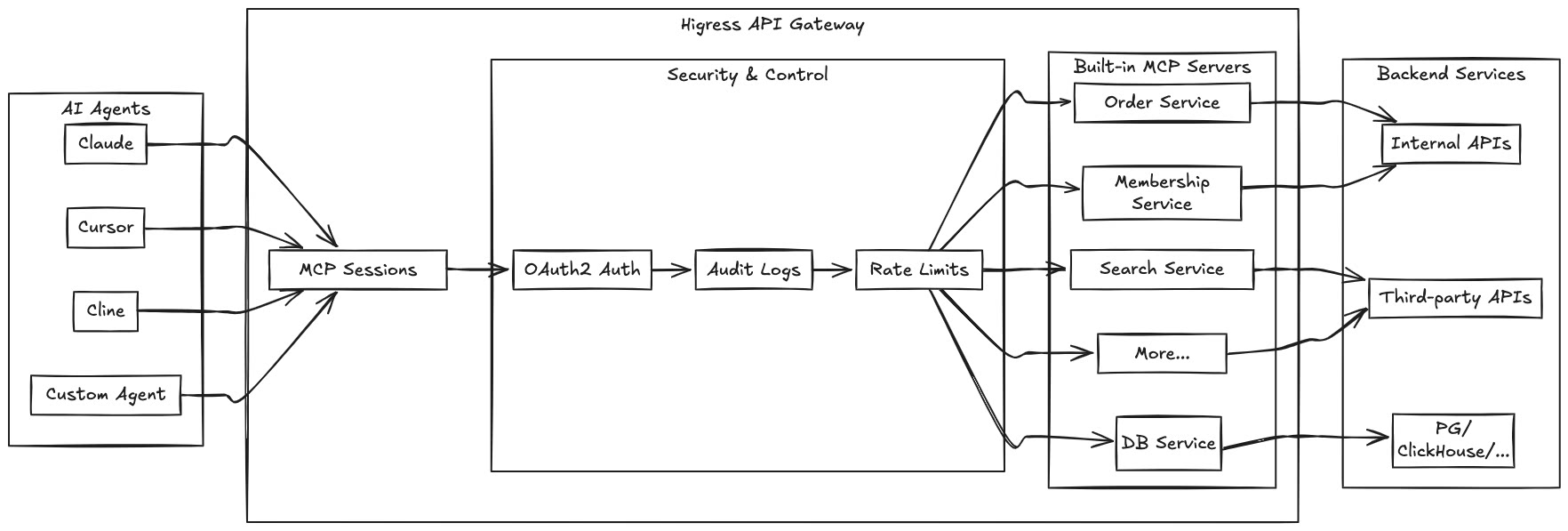
By hosting MCP Servers with Higress, you can achieve:
- Unified authentication and authorization mechanisms, ensuring the security of AI tool calls
- Fine-grained rate limiting to prevent abuse and resource exhaustion
- Comprehensive audit logs recording all tool call behaviors
- Rich observability for monitoring the performance and health of tool calls
- Simplified deployment and management through Higress’s plugin mechanism for quickly adding new MCP Servers
Runtime Properties
Section titled “Runtime Properties”Plugin execution phase: Default Phase
Plugin execution priority: 30
Configuration Fields
Section titled “Configuration Fields”Server Configuration
Section titled “Server Configuration”| Name | Data Type | Required | Default | Description |
|---|---|---|---|---|
server.name | string | Yes | - | Name of the MCP server. For a built-in server, use its registered name and configure server.config as required by that server; tools is not needed. For REST-to-MCP, choose a custom name. |
server.type | string | No | rest | MCP server type. Options: rest (REST-to-MCP conversion), mcp-proxy (MCP proxy). Defaults to rest if not specified. |
server.config | object | No | {} | Server configuration, such as API keys |
server.mcpServerURL | string | Required when server.type is mcp-proxy | - | Backend MCP server URL. Supports a full URL, such as https://example.com/mcp, or a path, such as /mcp, resolved against the route’s backend cluster. |
server.transport | string | Required when server.type is mcp-proxy | - | Backend transport: http for HTTP-based MCP, or sse for legacy HTTP+SSE. |
server.timeout | integer | No | 5000 | Timeout for each backend HTTP request, in milliseconds. Applies to mcp-proxy; it is not an overall deadline for a flow with multiple steps such as detection and initialization. |
server.passthroughAuthHeader | boolean | No | false | For MCP proxy only. Forwards the complete client Authorization header unchanged. Use this option on its own for direct passthrough; if an upstream security scheme is also configured, that scheme takes precedence. This option does not validate credentials. |
server.securitySchemes | array of object | No | - | Defines reusable security schemes that can be referenced by tools. See the Authentication and Security section for details. |
server.defaultDownstreamSecurity | object | No | - | Default client credential extraction configuration, overridden by tool-level security. Supports id and passthrough; it does not validate client identity. See Authentication and Security for its scope. |
server.defaultUpstreamSecurity | object | No | - | Default backend authentication configuration, overridden by tool-level requestTemplate.security. id references a security scheme. REST-to-MCP also supports credential overrides; for MCP proxy, configure fixed credentials with the scheme’s defaultCredential. |
server.version | string | No | 1.0.0 | Server version reported in legacy MCP initialization responses. Does not select the MCP protocol version. |
server.protocolStrategy | string | No | legacy | Backend protocol strategy: legacy, modern, or auto. For mcp-proxy only; see Protocol Support and Backend Connections. |
server.autoDetection.probeTimeoutMs | integer | No | 1000 | Backend protocol detection timeout, in milliseconds. Must be a positive integer. Used only with protocolStrategy: auto and transport: http; the effective detection timeout does not exceed server.timeout. |
Tool Set Configuration
Section titled “Tool Set Configuration”Use toolSet to combine registered tools from multiple servers. Use server for a single server or toolSet for a combined tool set; choose one of these configurations.
toolSet provides the combined tool list. Tool calls require the mcp-router plugin to route requests to the original server. It does not automatically discover or import tools from backend URLs.
| Name | Data Type | Description |
|---|---|---|
toolSet.name | string | Tool set name. |
toolSet.version | string | Tool set version, defaulting to 1.0.0, reported in legacy MCP initialization responses. |
toolSet.serverTools | array of object | Servers and tools to include. |
toolSet.serverTools[].serverName | string | Registered server that owns the tools. |
toolSet.serverTools[].tools | array of string | Names of the tools to include from that server. |
This example assumes that get_weather from weather-server is already registered and mcp-router is configured to route tool calls to the original server:
toolSet: name: travel-tools version: "1.0.0" serverTools: - serverName: weather-server tools: - get_weatherCombined tool names use the format serverName___toolName, such as weather-server___get_weather.
Allowed Tools Configuration
Section titled “Allowed Tools Configuration”| Name | Data Type | Required | Default | Description |
|---|---|---|---|---|
allowTools | array of string | No | - | List of tools allowed to be called. If not specified, all tools are allowed |
Dynamic Tool Permission Control
Section titled “Dynamic Tool Permission Control”In addition to statically defining allowTools in the configuration, tool access permissions can be dynamically controlled through the HTTP request header x-envoy-allow-mcp-tools. This allows upstream plugins (such as authentication and authorization plugins) to dynamically set the list of allowed tools based on user identity or other conditions.
Header Format:
x-envoy-allow-mcp-tools: tool1,tool2,tool3Permission Control Logic:
- Configuration-level
allowTools(static): Base tool whitelist defined in the plugin configuration - Header-level
x-envoy-allow-mcp-tools(dynamic): Tool whitelist read from request header - Effective Permissions: Intersection of tools specified in both configuration and header
Header Value Semantics:
| Header State | Behavior |
|---|---|
| Header not present | No additional restriction, use allowTools from configuration |
Header is empty string "" | No additional restriction, use allowTools from configuration |
Header is whitespace string " , , " | Deny access to all tools (empty set) |
Header has value "tool1,tool2" | Intersect with configured allowTools |
Usage Scenarios:
-
Role-Based Access Control
# Define all available tools in configurationallowTools:- get-user-info- update-user-info- delete-user-info- admin-operationUpstream authentication plugin can set different tool permissions based on user roles:
- Regular users:
x-envoy-allow-mcp-tools: get-user-info - Advanced users:
x-envoy-allow-mcp-tools: get-user-info,update-user-info - Administrators: Don’t set header (allow all configured tools)
- Regular users:
-
Multi-Tenant Scenario
# Define tools available for tenantsallowTools:- tenant-query-data- tenant-update-data- tenant-reportUpstream plugin dynamically controls based on tenant subscription plan:
- Basic plan:
x-envoy-allow-mcp-tools: tenant-query-data - Professional plan:
x-envoy-allow-mcp-tools: tenant-query-data,tenant-update-data - Enterprise plan:
x-envoy-allow-mcp-tools: tenant-query-data,tenant-update-data,tenant-report
- Basic plan:
-
Temporary Permission Restriction
In special circumstances (e.g., system maintenance), upstream plugins can temporarily restrict access to certain tools:
x-envoy-allow-mcp-tools: read-only-tool1,read-only-tool2
Upstream Plugin Integration Guide:
For upstream plugins (such as authentication and authorization plugins) that need to dynamically set tool permissions, you must use proxywasm.ReplaceHttpRequestHeader to set the x-envoy-allow-mcp-tools header:
// Correct way: Use ReplaceHttpRequestHeader// This will override any value that users might have passed in, ensuring securityproxywasm.ReplaceHttpRequestHeader("x-envoy-allow-mcp-tools", "tool1,tool2,tool3")
// ❌ Wrong way: Use AddHttpRequestHeader// This may retain user-provided values, creating a security vulnerabilityproxywasm.AddHttpRequestHeader("x-envoy-allow-mcp-tools", "tool1,tool2,tool3")
Using ReplaceHttpRequestHeader ensures:
- Security: Users cannot bypass permission controls by directly passing the
x-envoy-allow-mcp-toolsheader in their requests - Reliability: The permission configuration set by the upstream plugin always takes effect and won’t be overridden by user input
- Predictability: The MCP Server plugin always receives the permission value set by the upstream plugin
Notes:
- Header value uses comma to separate multiple tool names
- Whitespace before and after tool names is automatically trimmed
- When configured
allowToolsis an empty array, all tool access is denied regardless of header settings - The MCP Server plugin automatically removes the
x-envoy-allow-mcp-toolsheader and doesn’t pass it to backend services
REST-to-MCP Tool Configuration
Section titled “REST-to-MCP Tool Configuration”| Name | Data Type | Required | Default | Description |
|---|---|---|---|---|
tools | array of object | No | [] | List of REST-to-MCP tool configurations |
tools[].name | string | Yes | - | Tool name |
tools[].description | string | Yes | - | Tool functionality description |
tools[].args | array of object | Yes | [] | Tool parameter definitions |
tools[].args[].name | string | Yes | - | Parameter name |
tools[].args[].description | string | Yes | - | Parameter description |
tools[].args[].type | string | No | string | Parameter type (string, number, integer, boolean, array, object) |
tools[].args[].required | boolean | No | false | Whether the parameter is required |
tools[].args[].default | any | No | - | Parameter default value |
tools[].args[].enum | array | No | - | List of allowed values for the parameter |
tools[].args[].items | object | No | - | Schema for array items (when type is array) |
tools[].args[].properties | object | No | - | Schema for object properties (when type is object) |
tools[].args[].position | string | No | - | Position of the parameter in the request (query, path, header, cookie, body) |
tools[].requestTemplate | object | Conditional | - | Configure when calling a REST API; can be omitted in direct response mode. |
tools[].requestTemplate.url | string | Required for REST API calls | - | Request URL template. Omit it or leave it empty to use direct response mode. |
tools[].requestTemplate.method | string | For REST API calls | - | HTTP method, such as GET or POST. Not needed in direct response mode. |
tools[].requestTemplate.headers | array of object | No | [] | Request header templates |
tools[].requestTemplate.headers[].key | string | Yes | - | Request header name |
tools[].requestTemplate.headers[].value | string | Yes | - | Request header value template |
tools[].requestTemplate.body | string | No | - | Explicit request body template. Takes precedence over automatic JSON or form body assembly; query parameters can still be configured separately. |
tools[].requestTemplate.argsToJsonBody | boolean | No | false | Places arguments without position in a JSON request body. Enable at most one of the three argsTo* switches; this option is unnecessary when using body. |
tools[].requestTemplate.argsToUrlParam | boolean | No | false | Adds arguments without position to the URL query. Enable at most one of the three argsTo* switches; this option can be combined with a body template. |
tools[].requestTemplate.argsToFormBody | boolean | No | false | Encodes arguments without position as a form request body. Enable at most one of the three argsTo* switches; this option is unnecessary when using body. |
tools[].responseTemplate | object | No | - | Response transformation template. If omitted, uses the raw backend response. Direct response mode requires body. |
tools[].responseTemplate.body | string | Required in direct response mode; otherwise optional | - | Response body template. Cannot be combined with prependBody or appendBody. |
tools[].responseTemplate.prependBody | string | No | - | Text to insert before the response body (mutually exclusive with body) |
tools[].responseTemplate.appendBody | string | No | - | Text to insert after the response body (mutually exclusive with body) |
tools[].security | object | No | - | Tool-level client credential extraction configuration. Supports credential passthrough; does not validate client identity. |
tools[].security.id | string | Required when tools[].security is configured | - | References a security scheme ID defined in server.securitySchemes. |
tools[].security.passthrough | boolean | No | false | Enables credential passthrough. A successfully extracted, non-empty client credential is applied to backend requests using the scheme in requestTemplate.security. |
tools[].requestTemplate.security | object | No | - | Security configuration for the HTTP request template, defining authentication between MCP Server and REST API. |
tools[].requestTemplate.security.id | string | Required when tools[].requestTemplate.security is configured | - | References a security scheme ID defined in server.securitySchemes. |
tools[].requestTemplate.security.credential | string | No | - | Backend credential for REST-to-MCP, overriding the referenced scheme’s defaultCredential. A successfully extracted, non-empty passthrough credential takes precedence when passthrough is enabled. |
tools[].errorResponseTemplate | string | No | - | Error response template used when the HTTP response status is greater than or equal to 300, or less than 200. |
tools[].legacyOnly | boolean | No | false | Restricts the tool to legacy MCP clients. When true, the tool is neither listed nor callable through MCP 2026-07-28. |
tools[].outputSchema | object | No | - | JSON Schema for structured tool output. Currently returned in legacy tool lists, but not MCP 2026-07-28 tool lists. The plugin does not validate output against this schema. |
Direct Responses
Section titled “Direct Responses”If requestTemplate.url is omitted or empty, the tool does not call a backend. Instead, it renders responseTemplate.body directly. The template can access .args and .config.
server:  name: greeting-server  type: rest
tools:- name: greet  description: Generate a greeting using a name  args:  - name: name    description: User name    type: string    required: true  responseTemplate:    body: "Hello, {{.args.name}}!"
Structured Output and Compatibility
Section titled “Structured Output and Compatibility”When outputSchema is configured and the backend response is valid JSON, the plugin also returns the raw backend JSON as structuredContent. Text produced by responseTemplate does not replace this structured content. In direct response mode, structured content comes from the valid JSON rendered by the template instead.
MCP 2026-07-28 validates input arguments before calling a tool. If the tool’s parameter definition cannot be used for validation, the tool may still appear in the list, but calls will be rejected. Set legacyOnly: true for tools that temporarily need to remain available only to legacy clients.
Protocol Support and Backend Connections
Section titled “Protocol Support and Backend Connections”The plugin supports tool services using MCP 2024-11-05, 2025-03-26, 2025-06-18, and 2026-07-28.
Built-in tools and REST-to-MCP do not require a backend MCP protocol strategy. When proxying an existing MCP server, configure transport and protocolStrategy according to the backend’s capabilities.
transport selects the backend transport:
| Value | Use Case |
|---|---|
http | Access an MCP backend over HTTP, supporting both legacy and MCP 2026-07-28 backends. |
sse | Connect to a legacy HTTP+SSE backend. |
protocolStrategy selects the MCP protocol strategy for backend requests:
| Value | Use Case | Requirements |
|---|---|---|
legacy | The backend uses legacy MCP. This is also the default when omitted. | Supports http or sse. |
modern | The backend uses MCP 2026-07-28. | Requires http. |
auto | Detect the HTTP backend’s protocol when serving an MCP 2026-07-28 client. | Use http. |
For example, to proxy an MCP 2026-07-28 backend:
server: name: my-mcp-proxy type: mcp-proxy transport: http protocolStrategy: modern mcpServerURL: "https://mcp.example.com/mcp" timeout: 5000To detect the backend protocol automatically, change the corresponding settings under server to:
protocolStrategy: auto autoDetection: probeTimeoutMs: 1000Keep the following in mind:
- MCP
2026-07-28clients can access legacy backends through the plugin. Legacy clients cannot access backends that support only MCP2026-07-28through the plugin. - Automatic detection with
autoapplies only to MCP2026-07-28client requests. Legacy client requests still follow the legacy flow. - Detection adds backend requests. If the backend protocol is known, configure
legacyormoderndirectly. - Detection requests use the configured backend credentials. The backend must allow those credentials to access its discovery interface. Backend instances behind the same route should have consistent protocol capabilities.
transport: sseenables access to legacy SSE backends; it does not provide a general real-time subscription or push service to clients.
Authentication and Security
Section titled “Authentication and Security”These settings manage the credentials used to access backends, including fixed credentials, client credential extraction, and credential passthrough.
defaultDownstreamSecurity and tool-level security define how to extract credentials from client requests. They do not validate credentials. Configure Higress authentication and authorization plugins to validate client identity and control access.
defaultUpstreamSecurity and tool-level requestTemplate.security define the authentication scheme used for backend requests.
Defining Security Schemes (server.securitySchemes)
Section titled “Defining Security Schemes (server.securitySchemes)”You can define a set of reusable security schemes at the server level. These schemes can later be referenced by tools to configure how the MCP Server authenticates requests to backend REST APIs.
Configuration Fields (server.securitySchemes[]):
| Name | Data Type | Required | Description |
|---|---|---|---|
id | string | Yes | Unique identifier for the security scheme, to be referenced in tool configurations. |
type | string | Yes | Authentication type, supporting http (for Basic and Bearer auth) and apiKey. |
scheme | string | No | When type is http, specifies the specific scheme, such as basic or bearer. |
in | string | No | When type is apiKey, specifies the location of the API key, such as header or query. |
name | string | No | When type is apiKey, specifies the header name or query parameter name. |
defaultCredential | string | No | Default credential for this scheme. For Basic Auth, this can be “user:password”; for Bearer Token, the token itself; for API Key, the key itself. |
Example (server.securitySchemes):
server: name: my-api-server securitySchemes: - id: MyBasicAuth type: http scheme: basic defaultCredential: "admin:secretpassword" # Default username and password - id: MyBearerToken type: http scheme: bearer defaultCredential: "eyJhbGciOiJIUzI1NiIsInR5cCI6IkpXVCJ9..." # Default Bearer Token - id: MyApiKeyInHeader type: apiKey in: header name: X-Custom-API-Key # API Key in a header named X-Custom-API-Key defaultCredential: "abcdef123456" # Default API Key - id: MyApiKeyInQuery type: apiKey in: query name: "api_token" # API Key in a query parameter named api_token defaultCredential: "uvwxyz789012"Applying Security Schemes in Tools
Section titled “Applying Security Schemes in Tools”For REST-to-MCP, define server.securitySchemes and reference a scheme by id in the tool’s requestTemplate.security to select the authentication method for backend REST API calls.
tools[].requestTemplate.security.id: References theidof a security scheme defined inserver.securitySchemes.tools[].requestTemplate.security.credential: Optional credential override for REST-to-MCP. Overrides the referenced scheme’sdefaultCredentialwhen no passthrough credential is used. For MCP proxy, configure fixed credentials in the scheme’sdefaultCredentialinstead.
Example:
tools:- name: get-user-details # ... other tool configuration ... requestTemplate: url: "https://api.example.com/users/{{.args.userId}}" method: GET security: id: MyBearerToken # Use the MyBearerToken scheme defined above # credential: "override_token_for_this_tool" # Optional: Override the default token for this tool# ...- name: update-inventory # ... other tool configuration ... requestTemplate: url: "https://api.example.com/inventory/{{.args.itemId}}" method: POST security: id: MyApiKeyInHeader # Use the MyApiKeyInHeader scheme # This tool will use the defaultCredential defined in MyApiKeyInHeaderPassthrough Authentication
Section titled “Passthrough Authentication”The passthrough authentication feature allows credentials provided by the MCP Client (e.g., an AI assistant) when calling the MCP Server to be passed through to the authentication process when the MCP Server calls the backend REST API.
Configuration:
-
Define the relevant schemes in
server.securitySchemesfor extracting client credentials and adding credentials to backend REST API requests. -
Configure tool-level credential extraction (
tools[].security): In tools where credential passthrough is needed, configure thesecurityfield:id: References the client credential extraction scheme. The plugin extracts and removes the credential from the original request without validating it.passthrough: true: Enables passthrough authentication.
-
Configure request template authentication (
tools[].requestTemplate.security): In the tool’srequestTemplate, configure thesecurityfield:id: References a security scheme defined inserver.securitySchemesthat is used for MCP Server to backend REST API authentication.- When
tools[].security.passthroughistrue, the credential extracted from the client will be applied to the backend REST API call according to thisrequestTemplate.securityscheme.
Example:
Suppose the MCP Client uses a Bearer Token to call the MCP Server, and the MCP Server needs to use an API Key to call the backend REST API.
server:  name: product-api-server  securitySchemes:  - id: ClientSideBearer # Client uses Bearer Token    type: http    scheme: bearer  - id: BackendApiKey    # Backend API uses X-API-Key    type: apiKey    in: header    name: X-API-Key    # defaultCredential: "optional_default_backend_key"
tools:- name: get-product-securely description: "Get product information (secure passthrough)" security: # Extract credentials from the client request id: ClientSideBearer # Extract the client Bearer Token passthrough: true # Enable passthrough args: - name: product_id description: "Product ID" type: string required: true requestTemplate: security: # MCP Server -> backend REST API authentication configuration id: BackendApiKey # Backend API requires this scheme. The passthrough credential will be applied according to this scheme. url: "https://api.example.com/products/{{.args.product_id}}" method: GETWorkflow:
- The MCP Client sends a request to the MCP Server’s
get-product-securelytool, with anAuthorizationheader containingBearer <client_token>. - The MCP Server identifies that the client is using a Bearer Token based on
tools[].security(id:ClientSideBearer). It extracts<client_token>from the request and removes the originalAuthorizationheader. - Because
passthrough: trueis set, the extracted<client_token>is marked for passthrough. - The MCP Server prepares to call the backend REST API. It looks at
requestTemplate.security(id:BackendApiKey). - Since passthrough is enabled, the MCP Server uses the previously extracted
<client_token>as the credential value, applying it according to theBackendApiKeyscheme (i.e., as an HTTP header namedX-API-Key). - The backend REST API receives the request with the
X-API-Keyheader containing the value<client_token>.
Notes:
- When
tools[].security.passthroughis enabled and a non-empty credential is successfully extracted, that credential takes precedence. If none is extracted, configured fixed credentials may still be used. - The extracted credential value, such as a Bearer Token or the Base64-encoded part of Basic credentials, is added to the backend request according to its security scheme. Ensure that the credential format is compatible with that scheme.
Server-Level Default Authentication Configuration
Section titled “Server-Level Default Authentication Configuration”Server-level defaults reduce repeated credential configuration across tools. REST-to-MCP uses these settings for tool calls. MCP proxy also uses server-level defaults when fetching backend tool lists. These settings do not enable client authentication for every MCP interface.
server.defaultDownstreamSecurity
Section titled “server.defaultDownstreamSecurity”Defines the default client credential extraction settings, overridden by tool-level security.
id: References a credential extraction scheme inserver.securitySchemes.passthrough: Whether to use the extracted credential in backend requests. Defaults tofalse.
server.defaultUpstreamSecurity
Section titled “server.defaultUpstreamSecurity”Defines the default backend authentication settings, overridden by tool-level requestTemplate.security.
id: References a backend security scheme inserver.securitySchemes.credential: Optional credential override for REST-to-MCP. For MCP proxy, use the scheme’sdefaultCredentialfor fixed credentials.
Priority Rules
Section titled “Priority Rules”Tool-level security overrides server.defaultDownstreamSecurity; tool-level requestTemplate.security overrides server.defaultUpstreamSecurity.
When passthrough is enabled and a non-empty credential is successfully extracted, that credential takes precedence. If none is extracted, configured fixed credentials may still be used:
- REST-to-MCP: Uses
credentialfrom the selected upstream security configuration, falling back to the referenced scheme’sdefaultCredential. - MCP proxy: Uses the scheme’s
defaultCredential. If tools need different fixed credentials, define separate schemes and reference them from the tools.
Parameter Type Support
Section titled “Parameter Type Support”REST-to-MCP tools support various parameter types, allowing you to define tool parameters more precisely:
- string: String type (default)
- number: Number type (floating point)
- integer: Integer type
- boolean: Boolean type (true/false)
- array: Array type, using the
itemsfield to define the schema for array elements - object: Object type, using the
propertiesfield to define the schema for object properties
Example:
args:- name: query description: "Search keyword" type: string required: true- name: limit description: "Number of results to return" type: integer default: 10- name: filters description: "Filter conditions" type: object properties: category: type: string enum: ["food", "hotel", "attraction"] price: type: integer minimum: 0- name: coordinates description: "List of coordinate points" type: array items: type: object properties: lat: type: number lng: type: numberParameter Position Control
Section titled “Parameter Position Control”REST-to-MCP tools support precise control of each parameter’s position in the request through the position field. This allows you to build API requests more flexibly, for example, using path parameters, query parameters, and request body parameters simultaneously.
Supported Position Types
Section titled “Supported Position Types”- query: Parameter will be added to the URL as a query parameter
- path: Parameter will replace a path placeholder in the URL, such as
{petId}in/pet/{petId} - header: Parameter will be added to the request as an HTTP header
- cookie: Parameter will be added to the request as a Cookie
- body: Parameter will be added to the request body (automatically formatted as JSON or form based on content type)
Usage Example
Section titled “Usage Example”args:- name: petId description: "Pet ID" type: string required: true position: path- name: token description: "Authentication token" type: string required: true position: header- name: sessionId description: "Session ID" type: string position: cookie- name: limit description: "Number of results to return" type: integer default: 10 position: query- name: tags description: "List of tags" type: array position: bodyIn the example above:
petIdwill replace the{petId}placeholder in the URLtokenwill be added as an HTTP header to the requestsessionIdwill be added as a Cookie to the requestlimitwill be added as a query parameter to the URLtagswill be added to the request body
Relationship with Bulk Parameter Processing Options
Section titled “Relationship with Bulk Parameter Processing Options”When using position to specify parameter locations, these parameters will be processed according to their specified positions and will not be affected by bulk parameter processing options (argsToJsonBody, argsToUrlParam, argsToFormBody). Only parameters without a specified position will be affected by these bulk options.
For example, if you use both position and argsToJsonBody:
- Parameters with
position: querywill be added to the URL query string - Parameters with
position: headerwill be added as HTTP headers - Parameters with
position: pathwill replace placeholders in the URL - Parameters with
position: cookiewill be added as Cookies - Parameters with
position: bodywill be added to the JSON request body - Parameters without a specified
positionwill be added to the JSON request body viaargsToJsonBody
When body is configured, parameters with position: body are not added to the request body automatically. They remain accessible as .args.parameterName in the template.
Request Parameter Passing Methods
Section titled “Request Parameter Passing Methods”In addition to setting individual parameter locations with position, use the following options to build the request body or pass arguments in bulk. Enable at most one of argsToJsonBody, argsToUrlParam, and argsToFormBody.
-
body: Manually construct the request body using a template. This is the most flexible approach, allowing you complete control over the request body format.
requestTemplate:body: |{"query": "{{.args.query}}","filters": {{toJson .args.filters}},"options": {"limit": {{.args.limit}}}} -
argsToJsonBody: When set to
true, parameters without a specifiedpositionwill be sent directly as a JSON object in the request body, and theContent-Type: application/json; charset=utf-8header will be automatically added.requestTemplate:argsToJsonBody: true -
argsToUrlParam: When set to
true, parameters without a specifiedpositionwill be added to the URL as query parameters.requestTemplate:argsToUrlParam: true -
argsToFormBody: When set to
true, parameters without a specifiedpositionwill be encoded asapplication/x-www-form-urlencodedin the request body, and the appropriate Content-Type header will be automatically added.requestTemplate:argsToFormBody: true
Use body to construct the request body explicitly. When configured, this template takes precedence over automatic JSON or form body assembly. Query parameters can still be configured using position: query or argsToUrlParam.
When using body, there is no need to enable argsToJsonBody or argsToFormBody.
Template Syntax
Section titled “Template Syntax”The REST-to-MCP feature uses the GJSON Template library for template rendering, which combines Go’s template syntax with GJSON’s powerful path syntax:
Request Templates
Section titled “Request Templates”Used to construct HTTP request URLs, headers, and bodies:
- Access configuration values:
.config.fieldName - Access tool parameters:
.args.paramName
Templates also provide the following IP address functions:
| Function | Purpose |
|---|---|
getSocketIP | Returns the peer IP address of the current connection. |
getRealIP | Returns the first IP in X-Forwarded-For, or the connection peer IP if the header is absent. |
requestTemplate: url: "https://api.example.com/query" method: GET headers: - key: X-Client-IP value: "{{getRealIP}}"getRealIP reads the header value; it does not validate the proxy chain or establish whether the address is trustworthy.
Response Templates
Section titled “Response Templates”Used to transform HTTP responses into formats suitable for AI consumption:
- Access JSON response fields using GJSON path syntax
- Use template functions like
add,upper,lower, etc. - Use control structures like
if,range, etc.
GJSON Template includes all Sprig functions, providing 70+ template functions for string manipulation, mathematical operations, date formatting, and more, making it functionally equivalent to Helm’s template capabilities.
Commonly used Sprig functions include:
- String manipulation:
trim,upper,lower,replace,plural,nospace - Math operations:
add,sub,mul,div,max,min - Date formatting:
now,date,dateInZone,dateModify - List operations:
list,first,last,uniq,sortAlpha - Dictionary operations:
dict,get,set,hasKey,pluck - Flow control:
ternary,default,empty,coalesce - Type conversion:
toString,toJson,toPrettyJson,toRawJson - Encoding/decoding:
b64enc,b64dec,urlquery,urlqueryescape - UUID generation:
uuidv4
For a complete reference of all available functions, see the Helm function documentation, as GJSON Template includes the same function set.
GJSON Path Syntax
Section titled “GJSON Path Syntax”GJSON provides powerful JSON querying capabilities:
- Dot notation:
address.city - Array indexing:
users.0.name - Array iteration:
users.#.name - Array filtering:
users.#(age>=30)#.name - Modifiers:
users.@reverse.#.name - Multipath:
{name:users.0.name,count:users.#} - Escape characters:
path.with\.dot
For more complex queries, you can use the gjson function:
<!-- Using the gjson function for complex queries -->Active users: {{gjson "users.#(active==true)#.name"}}
<!-- Array filtering with multiple conditions -->Active developers over 30: {{gjson "users.#(active==true && age>30)#.name"}}
<!-- Using modifiers -->User names (reversed): {{gjson "users.@reverse.#.name"}}
<!-- Iterating over filtered results -->Admins:{{range $user := gjson "users.#(roles.#(==admin)>0)#"}}  - {{$user.name}} ({{$user.age}}){{end}}
For a complete reference of GJSON path syntax, see the GJSON documentation.
Configuration Examples
Section titled “Configuration Examples”Using Built-in MCP Server Example: Configuring quark-search
Section titled “Using Built-in MCP Server Example: Configuring quark-search”server: name: "quark-search" config: apiKey: "xxxx"This configuration uses Higress’s built-in quark-search MCP server. In this case, you only need to specify the server name and necessary configuration (such as API key), without configuring the tools field, as the tools are already predefined in the server.
MCP Proxy Server Example: Proxying to Backend MCP Server (StreamableHTTP)
Section titled “MCP Proxy Server Example: Proxying to Backend MCP Server (StreamableHTTP)”server: name: my-mcpserver-proxy type: mcp-proxy transport: http protocolStrategy: legacy mcpServerURL: "https://mcp.example.com/mcp" defaultUpstreamSecurity: id: BackendApiKey securitySchemes: - id: BackendApiKey type: apiKey in: header name: X-Backend-API-Key defaultCredential: "<default-backend-key>" - id: ProductApiKey type: apiKey in: header name: X-Backend-API-Key defaultCredential: "<product-tool-key>"
tools:- name: get-secure-product requestTemplate: security: id: ProductApiKey
allowTools:- get-secure-productFetching the tool list uses the default backend key; calling get-secure-product uses the product tool key. allowTools restricts access to that tool. Replace the key placeholders with actual credentials.
In proxy mode, tools provides per-tool configuration, not an allowlist. Use allowTools to restrict tool access.
MCP Proxy Server Example: Using SSE
Section titled “MCP Proxy Server Example: Using SSE”server: name: my-sse-mcpserver-proxy type: mcp-proxy transport: sse protocolStrategy: legacy mcpServerURL: "http://backend-mcp.example.com" timeout: 10000 defaultUpstreamSecurity: id: BackendBearer securitySchemes: - id: BackendBearer type: http scheme: bearer defaultCredential: "<backend-bearer-token>"
allowTools:- weather-tool- news-toolThis configuration accesses the backend using legacy SSE transport, authenticates with the configured Bearer Token, and restricts tools with allowTools. Replace the token placeholder with the actual credential.
The plugin handles the backend SSE exchange and returns the tool result. It does not provide a general real-time subscription or push service, and does not automatically copy all client request headers to the backend.
Advanced MCP Proxy Server Example: Passthrough Authentication
Section titled “Advanced MCP Proxy Server Example: Passthrough Authentication”server: name: my-secure-proxy type: mcp-proxy transport: http protocolStrategy: legacy mcpServerURL: "https://api.backend-mcp.com/v1/mcp" timeout: 10000 defaultDownstreamSecurity: id: ClientBearer passthrough: true defaultUpstreamSecurity: id: BackendBearer securitySchemes: - id: ClientBearer type: http scheme: bearer - id: BackendBearer type: http scheme: bearer - id: AdminApiKey type: apiKey in: header name: X-Admin-Key defaultCredential: "<admin-backend-key>"
tools:- name: get-user-data- name: admin-operation security: id: ClientBearer passthrough: false requestTemplate: security: id: AdminApiKeyWhen fetching the tool list or calling get-user-data, the plugin extracts the client Bearer Token and passes it to the backend. Calls to admin-operation use the fixed credential in AdminApiKey without passing through the client credential. Replace the key placeholder with the actual credential.
This configuration only manages backend credentials. Configure Higress authentication and authorization plugins to validate client identity and control access to the admin tool.
Basic Example: Converting AMap API
Section titled “Basic Example: Converting AMap API”server: name: rest-amap-server config: apiKey: your-api-key-heretools:- name: maps-geo description: "Convert structured address information to latitude and longitude coordinates. Supports parsing landmarks, scenic spots, and building names into coordinates." args: - name: address description: "The structured address to parse" type: string required: true - name: city description: "The city to search in" type: string required: false - name: output description: "Output format" type: string enum: ["json", "xml"] default: "json" requestTemplate: url: "https://restapi.amap.com/v3/geocode/geo" method: GET argsToUrlParam: true headers: - key: x-api-key value: "{{.config.apiKey}}" responseTemplate: body: | # Geocoding Information {{- range $index, $geo := .geocodes }} ## Location {{add $index 1}}
- **Country**: {{ $geo.country }} - **Province**: {{ $geo.province }} - **City**: {{ $geo.city }} - **City Code**: {{ $geo.citycode }} - **District**: {{ $geo.district }} - **Street**: {{ $geo.street }} - **Number**: {{ $geo.number }} - **Administrative Code**: {{ $geo.adcode }} - **Coordinates**: {{ $geo.location }} - **Level**: {{ $geo.level }} {{- end }}This configuration converts AMap’s geocoding API into a tool callable by AI. When the AI calls this tool:
- It builds an API request using the provided address and city parameters
- Calls the AMap API
- Transforms the JSON response into an easy-to-read Markdown format
- Returns the formatted result to the AI assistant
Advanced Example: Complex Response Processing with Conditional Logic
Section titled “Advanced Example: Complex Response Processing with Conditional Logic”server: name: weather-api-server config: apiKey: your-weather-api-keytools:- name: get-weather description: "Get weather forecast information for a specified city" args: - name: city description: "City name" type: string required: true - name: days description: "Number of days (1-7)" type: integer required: false default: 3 - name: include_hourly description: "Whether to include hourly forecasts" type: boolean default: true requestTemplate: url: "https://api.weatherapi.com/v1/forecast.json" method: GET argsToUrlParam: true headers: - key: x-api-key value: "{{.config.apiKey}}" responseTemplate: body: | # {{.location.name}}, {{.location.country}} Weather Forecast
**Current Temperature**: {{.current.temp_c}}°C **Feels Like**: {{.current.feelslike_c}}°C **Conditions**: {{.current.condition.text}} **Humidity**: {{.current.humidity}}% **Wind Speed**: {{.current.wind_kph}} km/h
## Future Forecast {{range $index, $day := .forecast.forecastday}} ### {{$day.date}} ({{dateFormat "Monday" $day.date_epoch | title}})
{{if gt $day.day.maxtemp_c 30}}**High Temperature Alert!**{{end}} {{if lt $day.day.mintemp_c 0}}**Low Temperature Alert!**{{end}}
- **Max Temperature**: {{$day.day.maxtemp_c}}°C - **Min Temperature**: {{$day.day.mintemp_c}}°C - **Chance of Rain**: {{$day.day.daily_chance_of_rain}}% - **Conditions**: {{$day.day.condition.text}}
#### Hourly Forecast {{range $hour := slice $day.hour 6 24 3}} - **{{dateFormat "15:04" $hour.time_epoch}}**: {{$hour.temp_c}}°C, {{$hour.condition.text}} {{end}} {{end}}This example demonstrates:
- Using conditional statements (
if) for temperature alerts - Using date formatting functions (
dateFormat) - Using array slicing (
slice) to select specific weather times - Nested loops to iterate through multiple days and time periods of weather data
Using PrependBody and AppendBody: OpenAPI Conversion
Section titled “Using PrependBody and AppendBody: OpenAPI Conversion”When you want to preserve the original API response but add additional context information, the prependBody and appendBody fields are very useful. This is particularly valuable when converting OpenAPI/Swagger specifications to MCP tools, as you can keep the original JSON response while providing explanations of field meanings for the AI assistant.
server:  name: product-api-server  config:    apiKey: your-api-key-heretools:- name: get-product  description: "Get detailed product information"  args:  - name: product_id    description: "Product ID"    type: string    required: true  requestTemplate:    url: "https://api.example.com/products/{{.args.product_id}}"    method: GET    headers:    - key: Authorization      value: "Bearer {{.config.apiKey}}"  responseTemplate:    prependBody: |      # Product Information
      Below is the detailed product information returned in JSON format. Field descriptions:
      - **id**: Unique product identifier      - **name**: Product name      - **description**: Product description      - **price**: Product price (USD)      - **category**: Product category      - **inventory**: Inventory information        - **quantity**: Current stock quantity        - **warehouse**: Warehouse location      - **ratings**: List of user ratings        - **score**: Rating (1-5)        - **comment**: Review content
      Original JSON response:
    appendBody: |
      You can use this information to understand the product's details, pricing, inventory status, and user reviews.
This example demonstrates:
- Using
prependBodyto add field descriptions before the original JSON response - Using
appendBodyto add usage suggestions at the end of the response - Preserving the original JSON response, allowing the AI assistant to directly access all data
Example of Customizing Error Responses Using errorResponseTemplate
Section titled “Example of Customizing Error Responses Using errorResponseTemplate”The errorResponseTemplate is used to customize the response transformation template when the HTTP response status code is >= 300 or < 200. It supports accessing header key-value pairs in map structure via _headers, so that values from the header can be referenced in the errorResponseTemplate to customize the error response result.
server: config: appCode: "" name: "Bank Card 2nd, 3rd, and 4th Element Verification"tools:- args: - description: "Bank card number" name: "cardno" position: "query" required: true type: "string" - description: "Name (Note: apply UrlEncode encoding)" name: "name" position: "query" required: false type: "string" - description: "Registered mobile number" name: "mobile" position: "query" required: false type: "string" - description: "ID card number" name: "idcard" position: "query" required: false type: "string" description: "Verify whether card number, name, mobile number, and ID card number match" errorResponseTemplate: |- statusCode: {{gjson "_headers.\\:status"}} errorCode: {{gjson "_headers.x-ca-error-code"}} data: {{.data.value}} name: "Bank Card 2nd, 3rd, and 4th Element Validation" requestTemplate: argsToFormBody: false argsToJsonBody: false argsToUrlParam: true method: "GET" url: "https://ckid.market.alicloudapi.com/lundear/verifyBank" responseTemplate: appendBody: |2- - Below are descriptions of the returned parameters - Parameter Name: code, Parameter Type: integer, Description: Response status code - Parameter Name: desc, Parameter Type: string, Description: Description message - Parameter Name: data, Parameter Type: object, Description: No description - Parameter Name: data.bankId, Parameter Type: string, Description: Bank code - Parameter Name: data.bankName, Parameter Type: string, Description: Bank name - Parameter Name: data.abbr, Parameter Type: string, Description: Bank abbreviation - Parameter Name: data.cardName, Parameter Type: string, Description: Card name - Parameter Name: data.cardType, Parameter Type: string, Description: Card type - Parameter Name: data.cardBin, Parameter Type: string, Description: Card BIN - Parameter Name: data.binLen, Parameter Type: integer, Description: Length of card BIN - Parameter Name: data.area, Parameter Type: string, Description: Region where the card belongs - Parameter Name: data.bankPhone, Parameter Type: string, Description: Bank phone number - Parameter Name: data.bankUrl, Parameter Type: string, Description: Bank website URL - Parameter Name: data.bankLogo, Parameter Type: string, Description: Bank logo URLThis example demonstrates:
- {{gjson “_headers.\:status”}} -> Get HTTP status code
- {{gjson “_headers.x-ca-error-code”}} -> Get value of header key “x-ca-error-code”
- {{.data.value}} -> Access original responseBody content (e.g., JSON field “data.value”)
Generate Configuration with an AI Assistant
Section titled “Generate Configuration with an AI Assistant”Provide the following prompt to an AI assistant and add your requirements:
Generate a Higress MCP Server plugin configuration using this documentation:https://higress.cn/en/docs/ai/mcp-server/
My use case:- Convert a REST API to MCP tools / Proxy an existing MCP server
For REST API conversion, I will provide:- API URL and HTTP method- Parameter definitions, parameter locations, and example responses- Backend authentication method- Content to return to the client
For an MCP proxy, I will provide:- Backend URL- Backend transport: http or sse- Backend MCP protocol version; if unknown, explain whether auto is suitable- Whether to use fixed backend credentials or pass through client credentials- Tools that clients may access- Any tools requiring separate backend credentials
Requirements:1. Output YAML that can be entered directly as the plugin configuration.   Do not include unrelated settings.2. Use placeholders for secrets and explain what must be replaced.3. MCP proxy configurations must include transport and mcpServerURL.4. Choose protocolStrategy based on the backend protocol; modern requires http.5. Use allowTools to restrict tool access.   In proxy mode, tools provides per-tool configuration, not an allowlist.6. Use securitySchemes[].defaultCredential for fixed proxy credentials.   Reference different schemes when tools require different credentials.7. Do not describe credential extraction or passthrough as client identity validation.8. Enable at most one of the three argsTo* switches for REST requests.   When a body template is used, the request body is not assembled automatically.9. List any missing information explicitly instead of making assumptions.
My specific requirements:[Enter requirements here]