HiMarket Observability Dashboard User Guide
Introduction
Section titled “Introduction”HiMarket integrates with Alibaba Cloud’s Log Service (SLS) to provide observability capabilities, supporting metric aggregation, chart display, and log retrieval based on access logs. This guide will walk you through configuring the SLS observability feature.
The HiMarket observability module relies on SLS and does not yet have an open-source implementation. It currently works under the following conditions:
- Using a commercial Alibaba Cloud AI Gateway (Alibaba Cloud AI Gateway or Apsara Enterprise Edition), simply enable SLS log delivery (out-of-the-box).
- Using open-source Higress, by configuring the
ai-statisticsplugin and log collection to deliver logs to Alibaba Cloud SLS.
Feature Overview
Section titled “Feature Overview”- Observability Dashboard: Statistics for model calls, MCP tool calls, request success rates, response times, etc.
- Log Query: Supports custom SQL queries for access logs.
- Authentication: Supports AK/SK authentication. STS support is planned.
- Automatic Fallback: Automatically returns empty data when SLS is not configured, ensuring the system continues to run normally.
Configuration Steps
Section titled “Configuration Steps”- If you are using open-source Higress, you need to perform the following configuration.
- If you are using a commercial Alibaba Cloud AI Gateway (Alibaba Cloud/Apsara Enterprise Edition), you do not need to perform the following steps; just enable log delivery.
Step 1: Prepare SLS Resources
Section titled “Step 1: Prepare SLS Resources”Before you begin, you need to prepare the following resources in the Alibaba Cloud SLS console:
1.1 Create a Project and Logstore
Section titled “1.1 Create a Project and Logstore”- Log in to the Alibaba Cloud SLS Console.
- Create a Project (e.g.,
apigateway-csb-cop). - Create a Logstore within the Project (e.g.,
apig-access-log).
1.2 Configure Log Collection (Taking Docker as an example)
Section titled “1.2 Configure Log Collection (Taking Docker as an example)”Collect the gateway’s access logs into the Logstore created above. It is recommended to use Higress version 2.1.9 or later, as its accesslogformat has been optimized for the HiMarket observability dashboard.
Confirm that Higress is deployed successfully using all-in-one deployment.
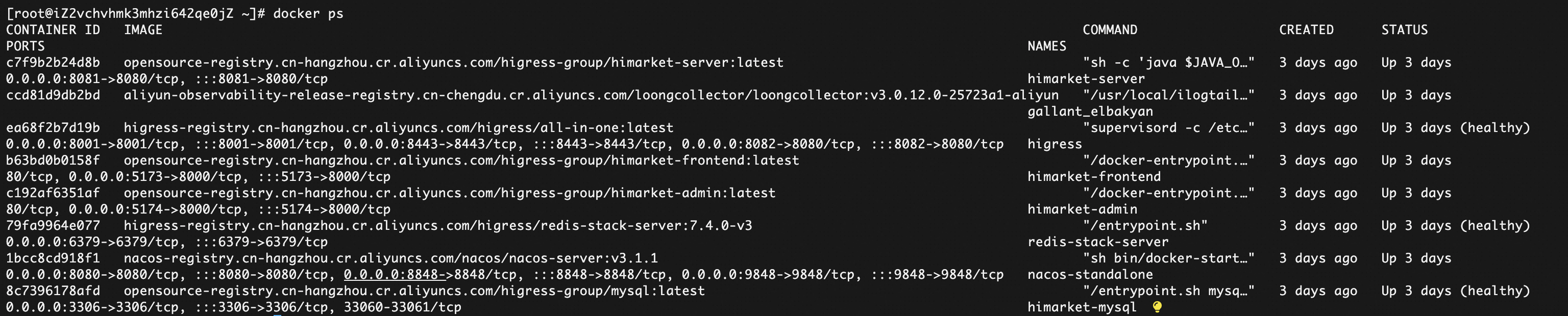
Confirm that logs are outputting correctly. Higress deployed via Docker outputs logs to /var/log/higress/gateway.log. You can view the log output directly on the host using docker exec higress tail -n 10 /var/log/higress/gateway.log.

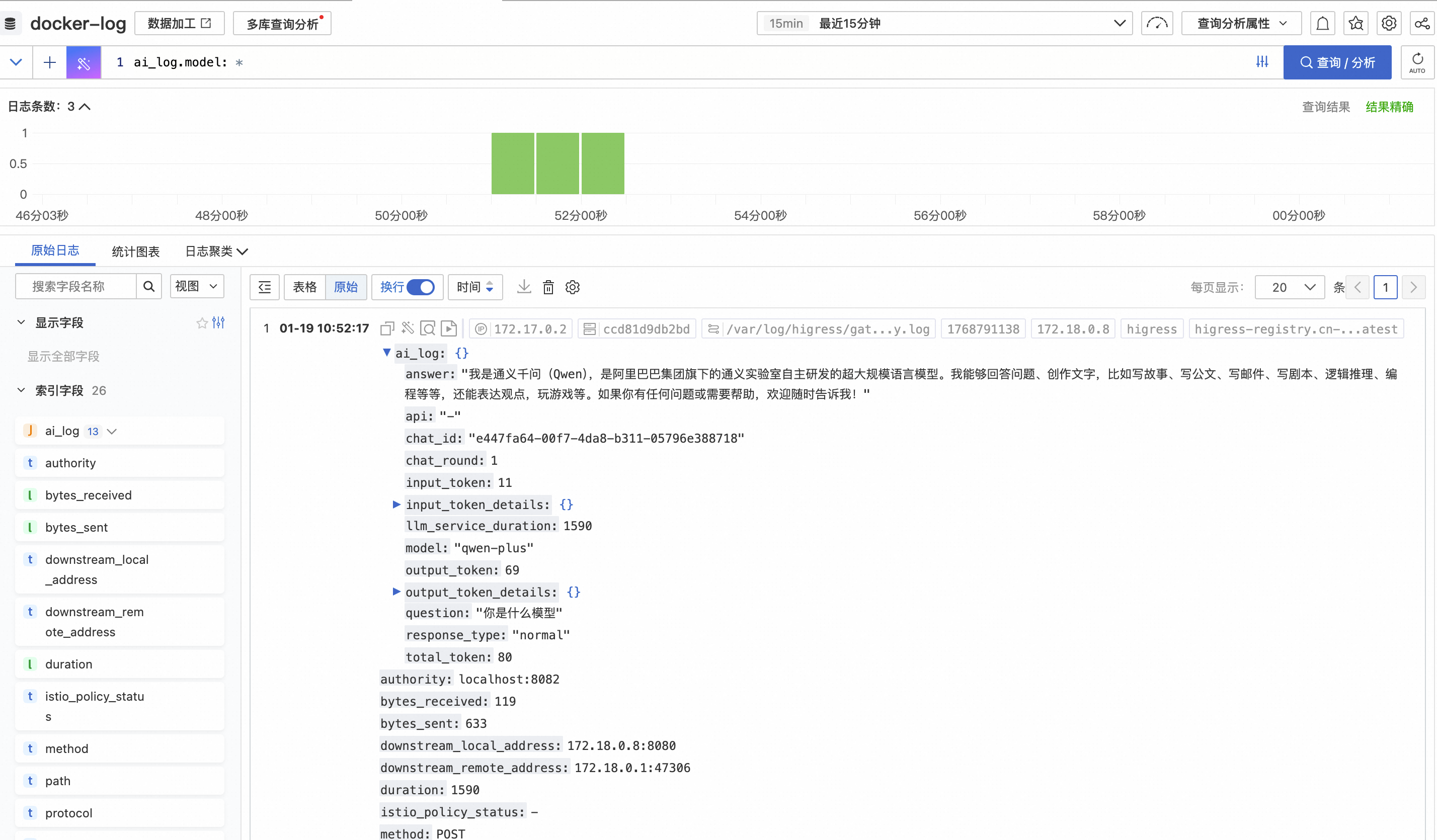
In a normal AI request, the ai_log field should contain a JSON object.
AI-related fields (JSON formatted ai_log field):
model: Model nameapi: API nameinput_token: Number of input tokensoutput_token: Number of output tokensresponse_type: Response type (stream/normal)llm_service_duration: LLM service durationcache_status: Cache status (hit/miss/skip)token_ratelimit_status: Rate limit statusmcp_tool_name: MCP tool name
After confirming that the log output is normal, you can refer to the SLS official documentation to configure Docker or K8s collection. For Higress deployed via Docker, refer to this document: https://help.aliyun.com/zh/sls/collect-docker-container-text-logs. The most critical steps are installing LoongCollector and Logtail, and configuring the collection for the /var/log/higress/gateway.log file. Since there are many logs and they need to support subsequent observability queries, you also need to configure the relevant SLS processing plugins.
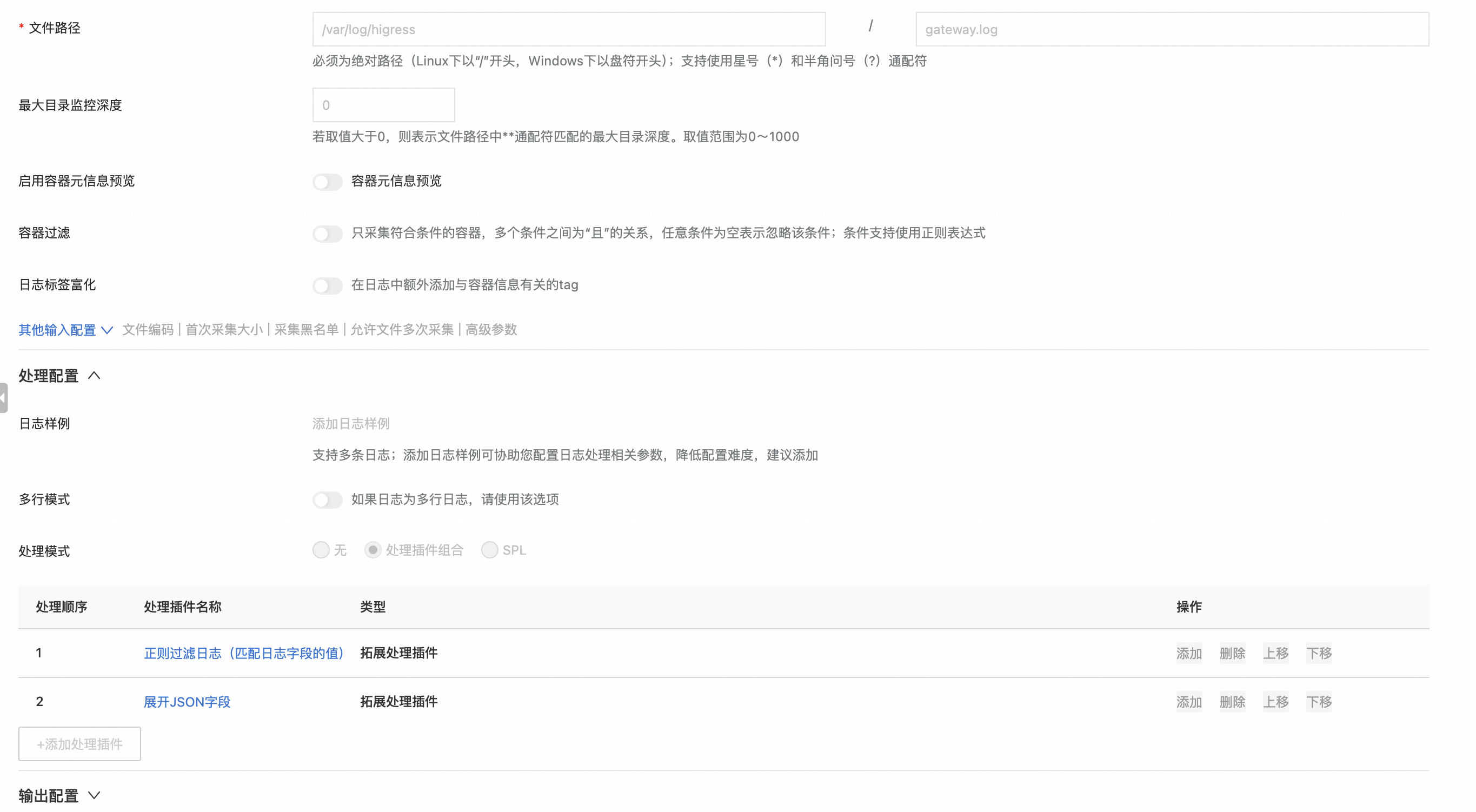
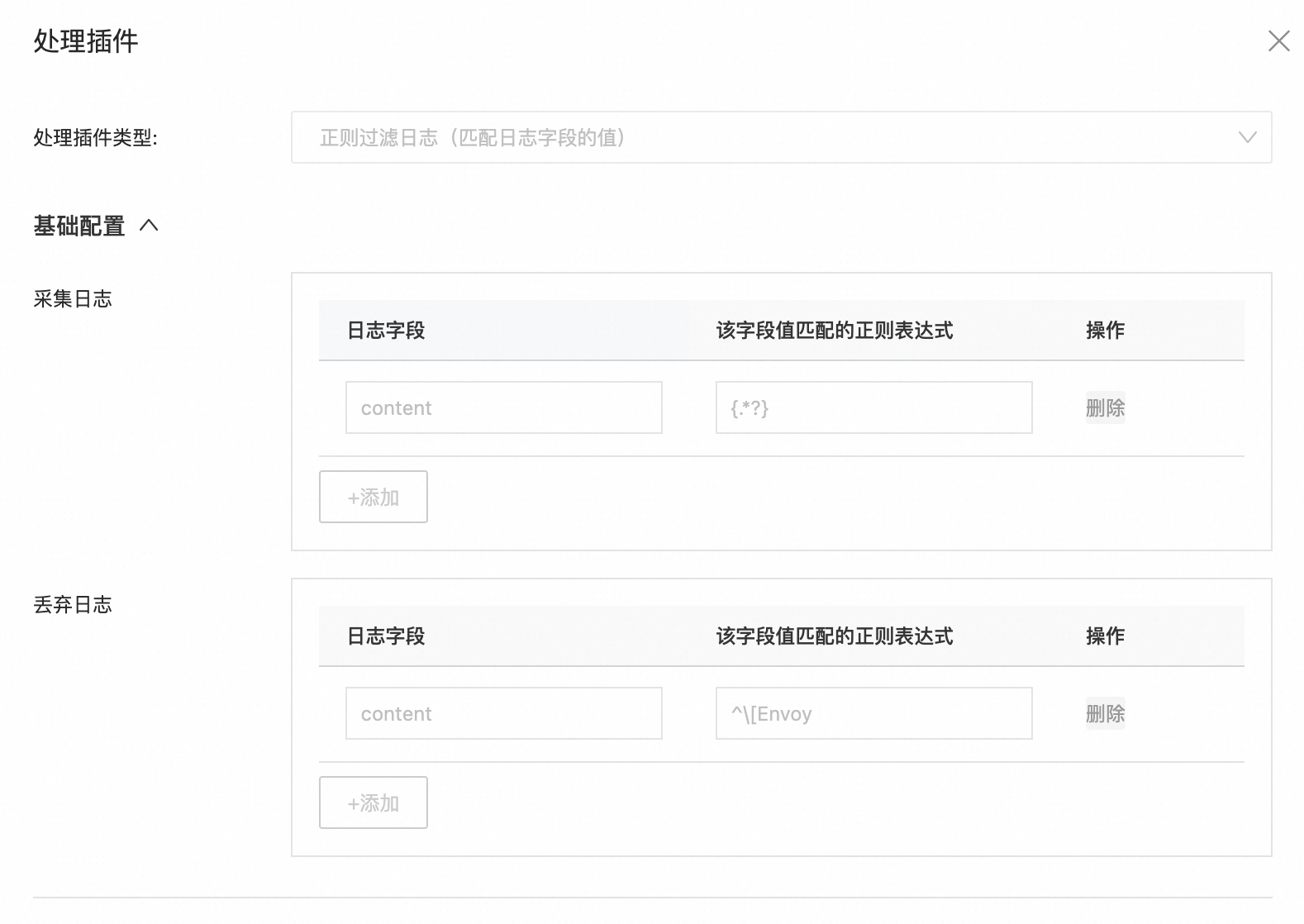
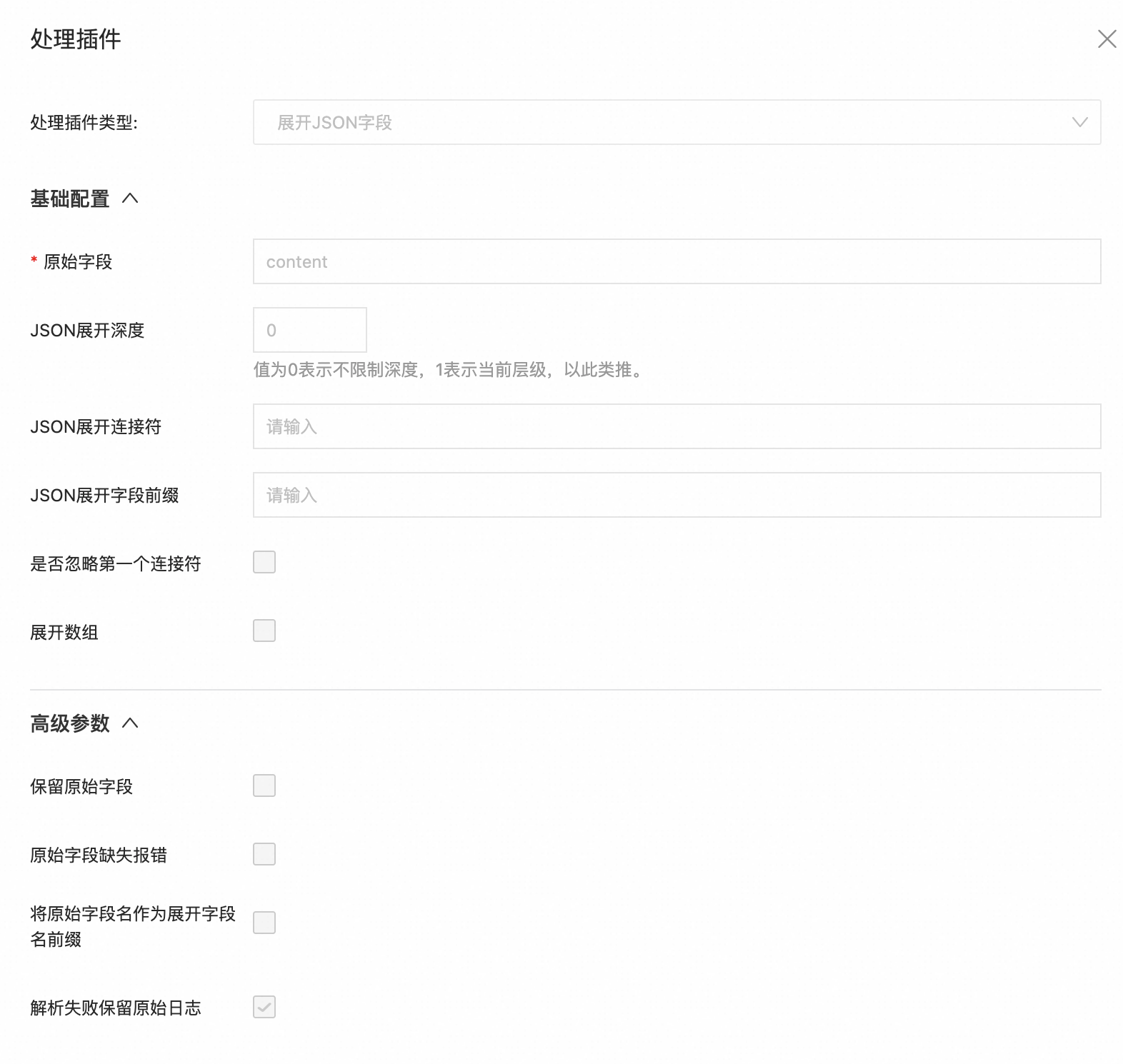
If the collection is successful, you should see detailed logs in the logstore, as shown below:
1.3 Configure Indexes
Section titled “1.3 Configure Indexes”The current version of HiMarket does not provide an automatic index update interface. You need to create indexes in the SLS console manually.
- Text Fields:
method,consumer,route_name,upstream_cluster, etc. - Numeric Fields:
duration,bytes_received,bytes_sent,response_code, etc. - JSON Field:
ai_log(Enable JSON indexing, including the AI-related fields listed above).
It is recommended to automatically build indexes based on the logs obtained in the SLS Query and Analysis properties after you have some raw data:
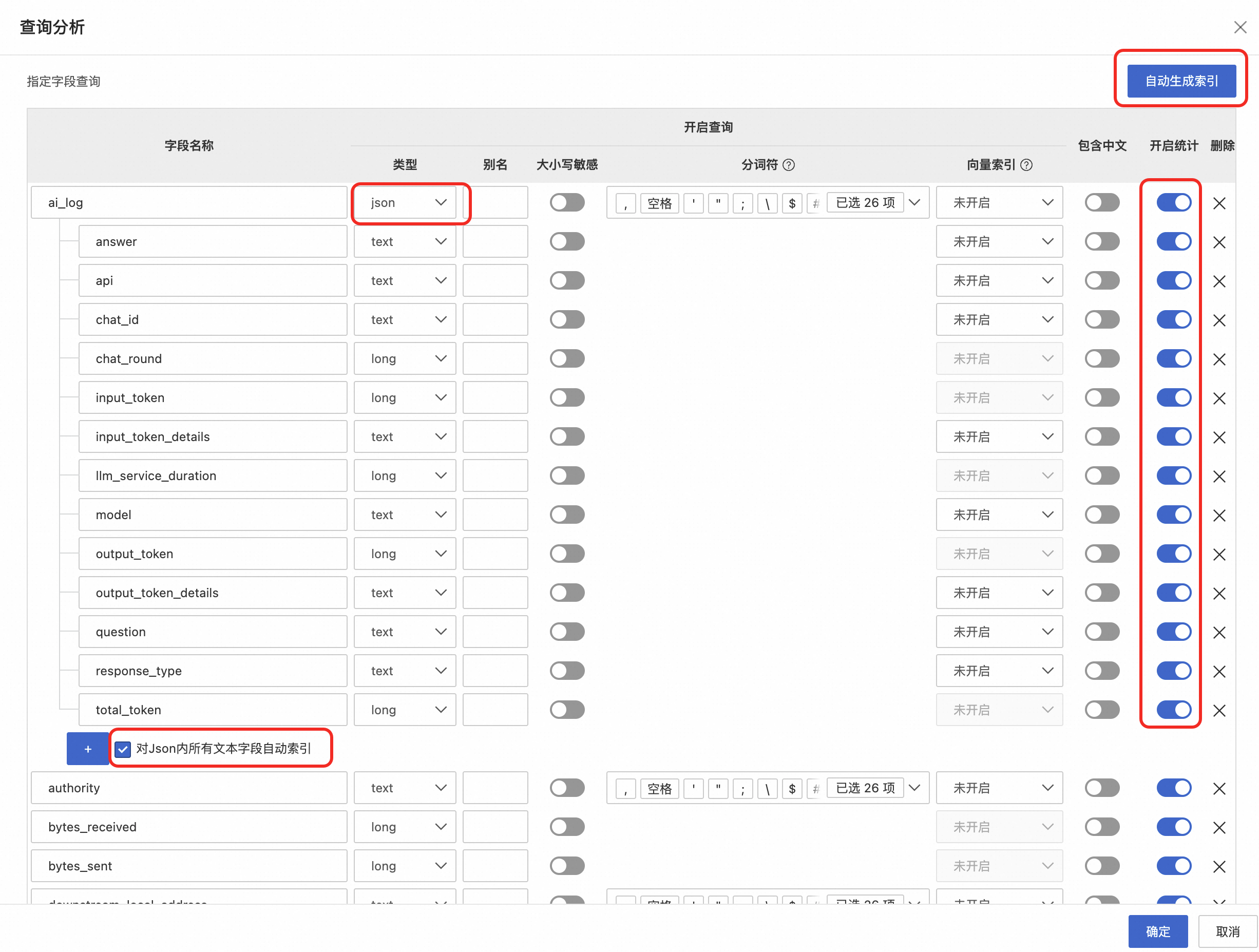
Key steps:
- Configure the
ai_logtype asjson. - Enable statistics for all fields, including the attribute fields of
ai_log, otherwise it will affect subsequent observability.
1.4 Obtain Authentication Credentials
Section titled “1.4 Obtain Authentication Credentials”Prepare AK/SK authentication credentials:
AK/SK (Recommended for development/testing environments)
- Log in to the Alibaba Cloud console.
- Go to the AccessKey Management page.
- Create or obtain an AccessKey ID and AccessKey Secret.
- Ensure this AccessKey has read permissions for SLS.
Step 2: Configure HiMarket
Section titled “Step 2: Configure HiMarket”2.1 Modify the Configuration File
Section titled “2.1 Modify the Configuration File”Edit himarket-bootstrap/src/main/resources/application.yml:
sls:  # SLS service endpoint (Required)  # Format: <region-id>.log.aliyuncs.com  # e.g., cn-hangzhou.log.aliyuncs.com, cn-beijing.log.aliyuncs.com  endpoint: ${SLS_ENDPOINT:}
  # Authentication type: AK_SK  auth-type: ${SLS_AUTH_TYPE:AK_SK}
  # Keys for AK/SK authentication  access-key-id: ${SLS_ACCESS_KEY_ID:}  access-key-secret: ${SLS_ACCESS_KEY_SECRET:}
  # Default Project name  default-project: ${SLS_DEFAULT_PROJECT:apigateway-csb-cop}
  # Default Logstore name  default-logstore: ${SLS_DEFAULT_LOGSTORE:apig-access-log}
  # AliyunLogConfig CR configuration (for K8s environments)  aliyun-log-config:    # Namespace where the CR is located    namespace: ${SLS_ALIYUN_LOG_CONFIG_NAMESPACE:apigateway-system}    # Name of the CR    cr-name: ${SLS_ALIYUN_LOG_CONFIG_CR_NAME:apigateway-access-log}
2.2 Configure Using Environment Variables (Recommended)
Section titled “2.2 Configure Using Environment Variables (Recommended)”For security reasons, it is recommended to pass sensitive information via environment variables instead of writing them directly into the configuration file:
Linux/macOS:
export SLS_ENDPOINT="cn-hangzhou.log.aliyuncs.com"export SLS_AUTH_TYPE="AK_SK"export SLS_ACCESS_KEY_ID="your-access-key-id"export SLS_ACCESS_KEY_SECRET="your-access-key-secret"export SLS_DEFAULT_PROJECT="apigateway-csb-cop"export SLS_DEFAULT_LOGSTORE="apig-access-log"Windows:
set SLS_ENDPOINT=cn-hangzhou.log.aliyuncs.comset SLS_AUTH_TYPE=AK_SKset SLS_ACCESS_KEY_ID=your-access-key-idset SLS_ACCESS_KEY_SECRET=your-access-key-secretset SLS_DEFAULT_PROJECT=apigateway-csb-copset SLS_DEFAULT_LOGSTORE=apig-access-logDocker Deployment:
Edit deploy/docker/docker-compose.yml:
services: himarket-server: environment: - SLS_ENDPOINT=cn-hangzhou.log.aliyuncs.com - SLS_AUTH_TYPE=AK_SK - SLS_ACCESS_KEY_ID=your-access-key-id - SLS_ACCESS_KEY_SECRET=your-access-key-secret - SLS_DEFAULT_PROJECT=apigateway-csb-cop - SLS_DEFAULT_LOGSTORE=apig-access-logKubernetes Deployment:
Edit deploy/helm/values.yaml:
sls: endpoint: "cn-hangzhou.log.aliyuncs.com" authType: "AK_SK" accessKeyId: "your-access-key-id" accessKeySecret: "your-access-key-secret" defaultProject: "apigateway-csb-cop" defaultLogstore: "apig-access-log"Step 3: Start and Verify
Section titled “Step 3: Start and Verify”3.1 Start HiMarket
Section titled “3.1 Start HiMarket”# Development environmentmvn clean installcd himarket-bootstrapmvn spring-boot:run
# Production environmentjava -jar himarket-bootstrap/target/himarket-bootstrap.jar3.2 Check Configuration Status
Section titled “3.2 Check Configuration Status”After startup, check the logs to confirm that the SLS configuration has been loaded successfully:
INFO c.a.h.config.SlsConfig - SLS endpoint configured: cn-hangzhou.log.aliyuncs.comINFO c.a.h.config.SlsConfig - SLS auth type: AK_SKINFO c.a.h.config.SlsConfig - SLS default project: apigateway-csb-copINFO c.a.h.config.SlsConfig - SLS default logstore: apig-access-logHigress Plugin Configuration
Section titled “Higress Plugin Configuration”Model Dashboard
Section titled “Model Dashboard”Example ai-statistics plugin configuration:
- config: attributes: - apply_to_log: true default_value: unknown key: consumer value: x-mse-consumer value_source: request_header - apply_to_log: true key: fallback_from value: x-higress-fallback-from value_source: request_header - apply_to_log: true apply_to_span: true as_separate_log_field: true key: question trace_span_key: gen_ai.input.messages value: messages.@reverse.0.content value_source: request_body - apply_to_log: true apply_to_span: true as_separate_log_field: true key: answer rule: append trace_span_key: gen_ai.input.messages value: choices.0.delta.content value_source: response_streaming_body - apply_to_log: true apply_to_span: true as_separate_log_field: true key: answer trace_span_key: gen_ai.input.messages value: choices.0.message.content value_source: response_body configDisable: false ingress: - ai-route-higress-qwen-max.internalMCP Dashboard
Section titled “MCP Dashboard”Example ai-statistics plugin configuration:
- config: attributes: - apply_to_log: true key: jsonrpc_version value: x-envoy-jsonrpc-version value_source: request_header trace_span_key: network.protocol.version apply_to_span: true - apply_to_log: true key: jsonrpc_id value: x-envoy-jsonrpc-id value_source: request_header trace_span_key: rpc.jsonrpc.request_id apply_to_span: true - apply_to_log: true key: jsonrpc_method value: x-envoy-jsonrpc-method value_source: request_header trace_span_key: mcp.method.name apply_to_span: true - apply_to_log: true key: jsonrpc_params value: x-envoy-jsonrpc-params value_source: request_header trace_span_key: mcp.arguments apply_to_span: true - apply_to_log: true key: jsonrpc_result value: x-envoy-jsonrpc-result value_source: response_header - apply_to_log: true apply_to_span: true attribute_key: tool.name key: mcp_tool_name value: x-envoy-mcp-tool-name value_source: request_header trace_span_key: mcp.tool.name apply_to_span: true - apply_to_log: true apply_to_span: true attribute_key: tool.parameters key: mcp_tool_arguments value: x-envoy-mcp-tool-arguments value_source: request_header - apply_to_log: true key: mcp_tool_response value: x-envoy-mcp-tool-response value_source: response_header - apply_to_log: true key: mcp_tool_error value: x-envoy-mcp-tool-error value_source: response_header configDisable: false ingress: - mcp-server-travel.internalExample pre-request plugin configuration:
apiVersion: extensions.higress.io/v1alpha1kind: WasmPluginmetadata: annotations: name: pre-request.internal namespace: himarket-systemspec: imagePullPolicy: Always matchRules: - config: stage: request configDisable: false ingress: - mcp-server-travel.internal phase: AUTHN priority: 1000 url: oci://higress-registry.cn-hangzhou.cr.aliyuncs.com/plugins/jsonrpc-converter:1.0.0Example pre-response plugin configuration:
apiVersion: extensions.higress.io/v1alpha1kind: WasmPluginmetadata: annotations: name: pre-response.internal namespace: himarket-systemspec: imagePullPolicy: Always matchRules: - config: stage: response configDisable: false ingress: - mcp-server-travel.internal phase: UNSPECIFIED_PHASE priority: 1000 url: oci://higress-registry.cn-hangzhou.cr.aliyuncs.com/plugins/jsonrpc-converter:1.0.0Plugin Priority Adjustment:
pre-request(json-converter):  phase: AUTHN  priority: 1000
key-auth:  phase: AUTHN  priority: 310
ai-statistics:  phase: AUTHN  priority: 100
pre-response(json-converter):  phase: UNSPECIFIED_PHASE  priority: 1000
mcp-server:  phase: UNSPECIFIED_PHASE  priority: 999
ai-security-guard:  phase: UNSPECIFIED_PHASE  priority: 850
Preset Scenario Descriptions
Section titled “Preset Scenario Descriptions”HiMarket has a rich set of built-in preset query scenarios, covering the Model Dashboard, MCP Dashboard, and more:
Card Type (CARD)
Section titled “Card Type (CARD)”| Scenario ID | Description | Applicable Dashboard |
|---|---|---|
pv | Total request count | Model, MCP |
uv | Unique caller count | Model, MCP |
fallback_count | Fallback request count | Model |
bytes_received | Gateway inbound traffic (MB) | MCP |
bytes_sent | Gateway outbound traffic (MB) | MCP |
input_token_total | Total input tokens | Model |
output_token_total | Total output tokens | Model |
token_total | Total tokens | Model |
Line Chart Type (LINE)
Section titled “Line Chart Type (LINE)”| Scenario ID | Description | Applicable Dashboard |
|---|---|---|
qps_stream | Streaming QPS | Model |
qps_normal | Non-streaming QPS | Model |
qps_total | Overall QPS | Model |
success_rate | Request success rate | Model, MCP |
token_per_sec_input | Input Tokens/s | Model |
token_per_sec_output | Output Tokens/s | Model |
token_per_sec_total | Total Tokens/s | Model |
rt_avg_total | Average response time (overall) | Model |
rt_avg_stream | Average response time (streaming) | Model |
rt_avg_normal | Average response time (non-streaming) | Model |
rt_first_token | Time to first token | Model |
cache_hit/miss/skip | Cache hit/miss/skip | Model |
ratelimited_per_sec | Rate-limited requests/s | Model |
qps_by_status | QPS grouped by status code | MCP |
qps_total_simple | Total QPS | MCP |
rt_avg | Average response time | MCP |
rt_p99/p95/p90/p50 | P99/P95/P90/P50 response time | MCP |
Table Type (TABLE)
Section titled “Table Type (TABLE)”| Scenario ID | Description | Applicable Dashboard |
|---|---|---|
model_token_table | Model token usage statistics | Model |
consumer_token_table | Consumer token usage statistics | Model |
service_token_table | Service token usage statistics | Model |
error_requests_table | Error request statistics | Model |
ratelimited_consumer_table | Rate-limited consumer statistics | Model |
risk_label_table | Risk type statistics | Model |
risk_consumer_table | Risk consumer statistics | Model |
method_distribution | Method distribution | MCP |
gateway_status_distribution | Gateway status code distribution | MCP |
backend_status_distribution | Backend status code distribution | MCP |
request_distribution | Request distribution | MCP |
Filter Option Scenarios (TABLE)
Section titled “Filter Option Scenarios (TABLE)”| Scenario ID | Description |
|---|---|
filter_service_options | Instance list |
filter_api_options | API list |
filter_model_options | Model list |
filter_route_options | Route list |
filter_consumer_options | Consumer list |
filter_upstream_options | Upstream service list |
filter_mcp_tool_options | MCP tool name list |
Troubleshooting
Section titled “Troubleshooting”Problem 1: API returns empty data
Section titled “Problem 1: API returns empty data”Cause Analysis:
- SLS is not configured (
endpointis empty). - The Project or Logstore does not exist.
- There is no log data within the specified time range.
- Incorrect authentication information.
Solution:
- Check if the configuration file or environment variables are set correctly.
- Review the application logs to confirm the SLS configuration loading status.
- Log in to the SLS console to confirm that the Project and Logstore exist.
- Use the SLS console to run a query and verify that data exists.
- Verify that the AccessKey has read permissions for SLS.
Problem 2: Query timeout
Section titled “Problem 2: Query timeout”Cause Analysis:
- The time range is too large.
- The volume of logs is too large.
- Indexes are not configured or are improperly configured.
Solution:
- Narrow the query time range.
- Configure indexes for the Logstore in the SLS console.
- Use preset scenarios instead of complex custom queries.
- Increase the
intervalparameter to reduce the number of data points.
Problem 3: Query results do not match expectations
Section titled “Problem 3: Query results do not match expectations”Cause Analysis:
- Log field mappings do not match.
- Incorrect index configuration.
- SQL syntax error.
Solution:
- Confirm that the log field names match those in the preset SQL.
- Check if JSON fields (like
ai_log) have JSON indexing enabled. - Check the application logs to see the actual SQL being executed.
- Manually execute the SQL in the SLS console to verify.
Problem 4: Authentication failed
Section titled “Problem 4: Authentication failed”Error Log:
ERROR c.a.h.s.g.f.SlsClientFactory - Failed to create SLS clientLogException: AccessKeyId is requiredSolution:
- Confirm that the environment variables are set correctly.
- Confirm that
auth-typeis set toAK_SK. - Confirm that the AccessKey ID and Secret are correct.
- Confirm that the AccessKey has not been disabled or expired.
Best Practices
Section titled “Best Practices”1. Security
Section titled “1. Security”- Do not write AccessKeys directly into configuration files.
- Use environment variables or Kubernetes Secrets to manage sensitive information.
- Rotate your AccessKeys periodically.
- Follow the principle of least privilege; grant only SLS read permissions.
2. Performance Optimization
Section titled “2. Performance Optimization”- Set a reasonable query time range; avoid querying more than 7 days at once.
- Configure indexes to improve query performance.
- Use preset scenarios instead of complex custom queries.
- Increase the interval to reduce data points in time-series charts.
3. Cost Control
Section titled “3. Cost Control”- Configure the Logstore storage period according to your needs.
- Set up log collection rules reasonably to avoid collecting unnecessary logs.
- Use SLS’s data life-cycle management features.
4. Monitoring and Alerting
Section titled “4. Monitoring and Alerting”- Configure alerts for query exceptions in the SLS console.
- Monitor HiMarket application logs for SLS-related errors.
- Periodically check SLS usage and costs.
Configuration Examples
Section titled “Configuration Examples”Complete Configuration for Development Environment
Section titled “Complete Configuration for Development Environment”sls: endpoint: cn-hangzhou.log.aliyuncs.com auth-type: AK_SK access-key-id: LTAI5tXXXXXXXXXXXXXX access-key-secret: YourAccessKeySecretHere default-project: dev-apigateway default-logstore: dev-access-log aliyun-log-config: namespace: apigateway-system cr-name: apigateway-access-logProduction Environment Configuration (Using Environment Variables)
Section titled “Production Environment Configuration (Using Environment Variables)”application.yml:
sls: endpoint: ${SLS_ENDPOINT:} auth-type: ${SLS_AUTH_TYPE:AK_SK} access-key-id: ${SLS_ACCESS_KEY_ID:} access-key-secret: ${SLS_ACCESS_KEY_SECRET:} default-project: ${SLS_DEFAULT_PROJECT:prod-apigateway} default-logstore: ${SLS_DEFAULT_LOGSTORE:prod-access-log}Environment Variables:
export SLS_ENDPOINT="cn-beijing.log.aliyuncs.com"export SLS_AUTH_TYPE="AK_SK"export SLS_ACCESS_KEY_ID="LTAI5tProdXXXXXXXXXX"export SLS_ACCESS_KEY_SECRET="ProdAccessKeySecretHere"Appendix
Section titled “Appendix”A. SLS Region Endpoint List
Section titled “A. SLS Region Endpoint List”| Region | Endpoint |
|---|---|
| China (Hangzhou) | cn-hangzhou.log.aliyuncs.com |
| China (Shanghai) | cn-shanghai.log.aliyuncs.com |
| China (Qingdao) | cn-qingdao.log.aliyuncs.com |
| China (Beijing) | cn-beijing.log.aliyuncs.com |
| China (Zhangjiakou) | cn-zhangjiakou.log.aliyuncs.com |
| China (Shenzhen) | cn-shenzhen.log.aliyuncs.com |
| China (Chengdu) | cn-chengdu.log.aliyuncs.com |
For more regions, please refer to: https://www.alibabacloud.com/help/en/log-service/latest/service-endpoints
B. Complete List of Configuration Parameters
Section titled “B. Complete List of Configuration Parameters”| Parameter | Type | Required | Default Value | Description |
|---|---|---|---|---|
endpoint | String | Yes | - | SLS service endpoint |
auth-type | Enum | No | AK_SK | Authentication type: AK_SK |
access-key-id | String | Conditional | - | AccessKey ID (required when auth-type is AK_SK) |
access-key-secret | String | Conditional | - | AccessKey Secret (required when auth-type is AK_SK) |
default-project | String | Yes | - | Default Project name |
default-logstore | String | Yes | - | Default Logstore name |
aliyun-log-config.namespace | String | No | apigateway-system | Namespace of the AliyunLogConfig CR |
aliyun-log-config.cr-name | String | No | apigateway-access-log | Name of the AliyunLogConfig CR |